
YouTube Tag Generator






Back in the early days of building a YouTube channel, uploading a video felt like launching something big into the world. 😂 Huge effort was there! First do research, then scripting, editing & putting engaging click-bait thumbnails. But the results were almost zero even after so much hard work.
Videos would disappear into a sea of similar content, struggling to gain even a handful of views.
See! The problem wasn’t always the content, instead the problem was discoverability.
Tags were treated as unimportant and generic phrases like “funny video” or “latest video” were added without any real strategy. The thing is that without optimized tags aligned with search trends and audience intent, even high-quality videos struggled to surface in YouTube’s ecosystem.
Today, creators don’t have to depend on guesswork. A YouTube Tag Generator, rolled out by GoogieTools, simplifies what once took hours of manual research. Instead of thinking endlessly, you can generate important, trend-aligned tags for your video topic in seconds. The right tags help YouTube algorithms understand your content better and improve discoverability. It also increases the chances of reaching the right audience.
In this post, we’ll talk about what is a YouTube Tag Generator & How it works, why it matters for YT channel growth and how you can use it strategically to boost visibility and performance. If you think your videos deserve more attention than they’re getting, you’re in the right post. 👍
What is a YouTube Tag Generator?
YouTube Tag Generator is a smart online tool from GoogieTools that creates optimized tags for your videos. These tags act as invisible signals, helping YouTube's algorithm understand and promote your content.
It's specifically built for creators who want to rank higher. YouTube Tag Generator generates relevant, SEO-friendly tags that help your videos get discovered faster on YouTube.
On YouTube, tags may seem small, but they play an important role behind the scenes. They act like signals that help the algorithm understand what your video is about. When used correctly, tags can improve the chances of your video appearing in search results and recommended feeds.
Instead of randomly adding broad terms like “vlog” or “tech review,” this tool analyzes your input like the video title, main keyword, or even a competitor’s URL, and generates tags that match real search intent. It uses AI-driven analysis and current data trends to suggest tags that are relevant.
Key Features of YouTube Tag Generator
This tool is built to make tagging fast and effective. Let’s break down the features in detail.
- AI-Powered Tag Suggestions: The core strength of this tool lies in its AI engine. Once you enter your video title, main keyword, or topic, the tool analyzes it and instantly generates a list of highly relevant tags. It also provides long-tail tags such as “how to use YouTube tag generator for beginners” or “best free YouTube SEO tools 2026.”.
- Based on Real Trends: One of the biggest challenges creators face is staying relevant. Trends on YouTube change quickly. What works today may not work next month. This tag generator pulls insights from current YouTube data and trending searches. That means the tags suggested are not outdated or random.
- Copy-Paste Ready Format: Optimization should not be complicated. That is why the tool provides tags in a clean, comma-separated format. You can simply generate the tags, copy them and paste them directly into YouTube Studio. There is no extra formatting required and no manual editing required at all.
- Multi-Language Support: YouTube is a global platform. If your audience speaks different languages, your tags should reflect that. The YouTube Tag Generator supports multiple languages, allowing you to generate tags in different regional formats. This is useful for creators targeting audiences in India, the US, Europe, or any other global market.
- Bulk Tag Generation: If you upload content in batches like weekly series, tutorials, or product reviews, you know how repetitive tagging can become. The bulk generation feature allows you to create optimized tags for multiple videos at once. Instead of repeating the same process again and again, you can streamline your workflow.
- Free and Unlimited Usage: One of the biggest advantages of GoogieTools is accessibility. You can generate tags without worrying about strict limits or expensive subscriptions. For creators just starting out, this is extremely helpful. You can test, experiment, and optimize without extra costs.
- SEO Insights and Data Indicators: Beyond just generating tags, the tool also provides useful SEO insights. It may show relevance scores, search volume estimates and competition levels for certain tags. This gives you more control over your strategy. Instead of blindly adding every suggested tag, you can choose tags with strong search potential and lower competition.
If your goal is to rank higher, attract the right audience, and grow your channel consistently, using the right tags is a smart place to start.
How to Use YouTube Tag Generator: A Step-by-Step Guide
Getting started is simple. You don’t need any technical knowledge or SEO experience. Just follow these clear steps to generate optimized YouTube tags quickly and efficiently.
Step 1: Go to googiehost.com/tools >> Open the YouTube Tag Generator >> There is no sign-up required for basic usage, so you can begin immediately.
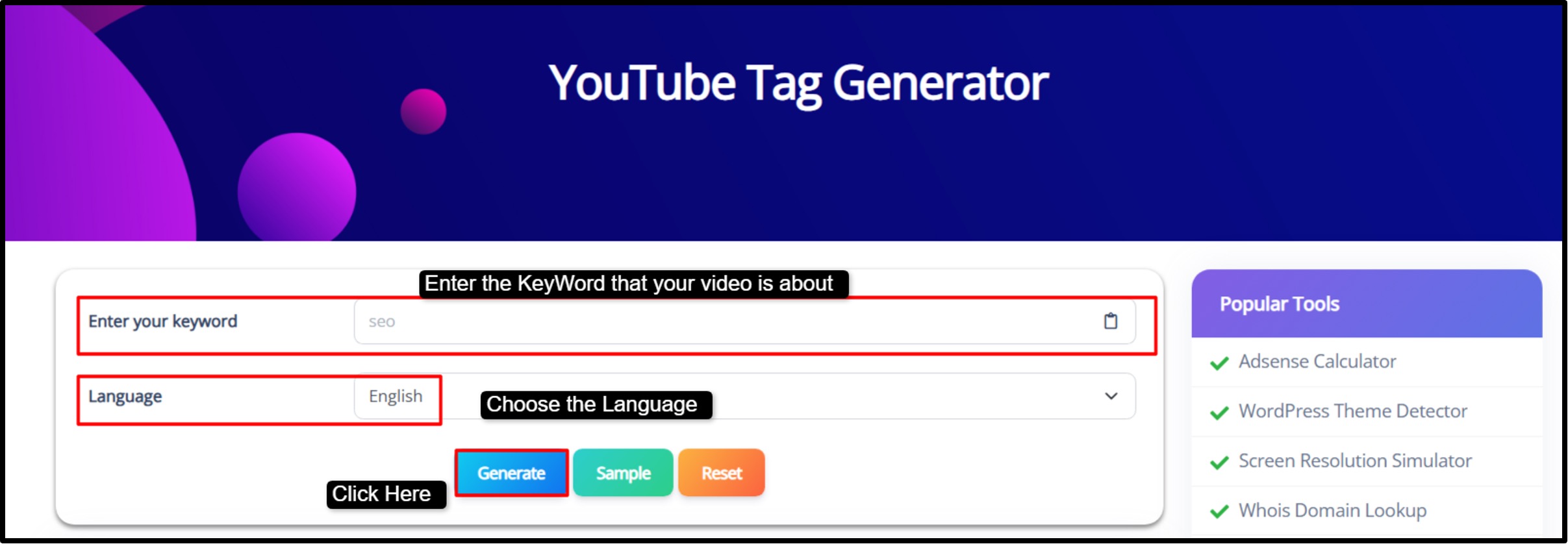
Step 2: Enter Your Main Keyword >> In the input box, type the primary keyword or topic of your video.
For example: “best gaming laptops 2026”
|
Note: Be specific with your keyword, as this helps the tool generate more accurate and relevant tag suggestions. |

Step 3: Select Your Preferred Language >> Choose the language in which you want your tags to be generated. This is especially useful if you are targeting a specific region.

Step 4: Click “Generate” >> Press the Generate button >> The AI will instantly analyze your keyword and produce a list of SEO-friendly tags for your topic.

Step 5: Review the Suggestions >> Carefully check the generated tags >> The first few suggestions are usually highly relevant and impactful, so prioritize them when adding tags to your video.
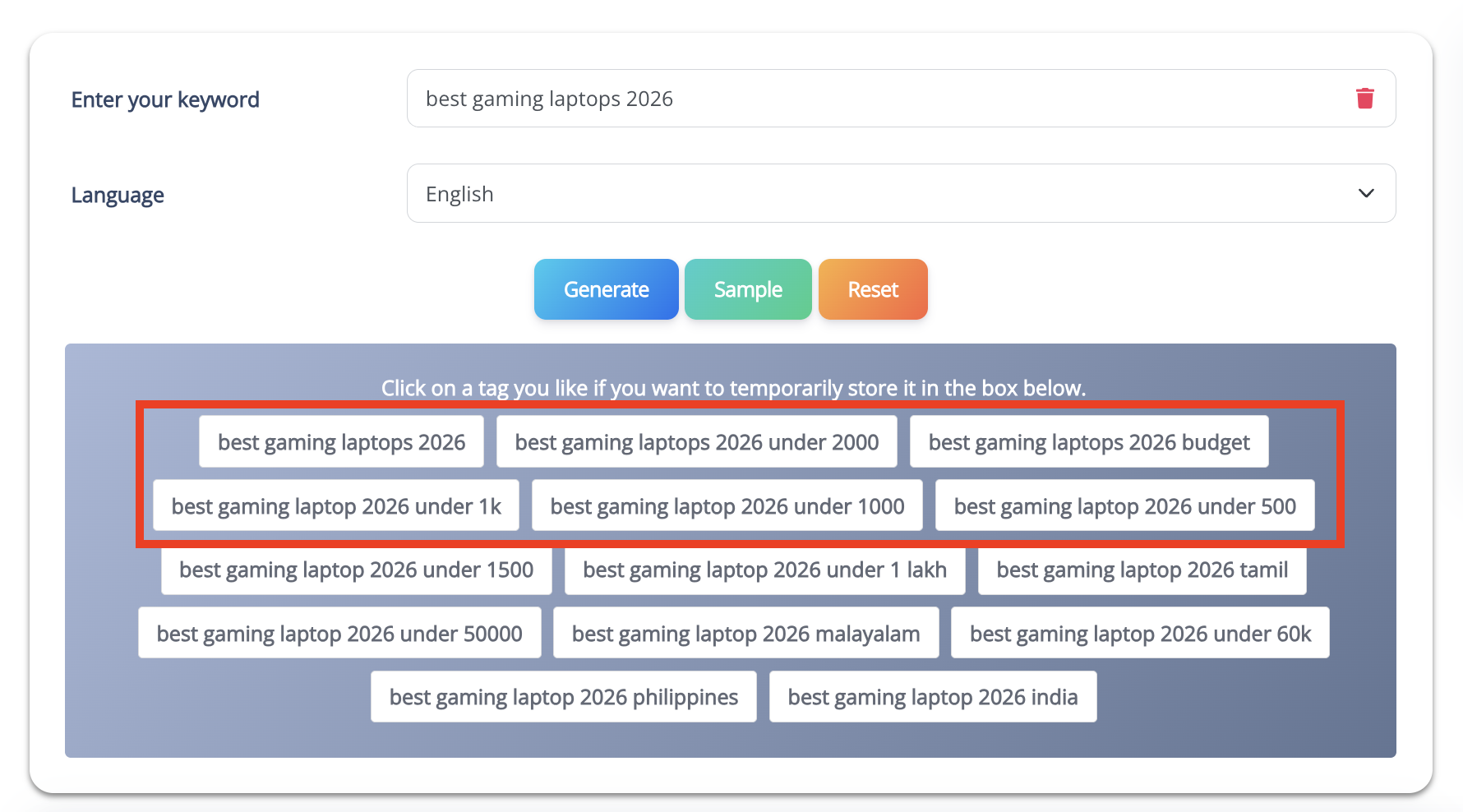
Step 6: Copy and Add to YouTube Studio >> Use the one-click copy option to copy the tags. >> Then, go to YouTube Studio, paste them into the tags section of your video, and save your changes.
This step-by-step process makes it easy for anyone searching for a “YouTube tag generator tutorial” to understand and apply effective tagging. Within minutes, your video will be better optimized and ready to compete in YouTube search and recommendations.
Pros and Cons of YouTube Tag Generator
No tool is perfect, so let's balance the scales for this YouTube tag generator.
Pros
- Generates tags in seconds, cutting manual research.
- Boosts video visibility with high-ranking keywords.
- Intuitive for beginners seeking "easy YouTube tag generator."
- Unlimited generations without hidden fees.
- Tailors tags to niches like gaming or beauty.
- Enhances targeting for more views and subs.
Cons
- Suggestions might need tweaks for ultra-specific content.
- Tags alone won't save poor videos; pair with quality.
- Requires online access, no offline mode.
- Advanced features like bulk exports need premium.
Even after considering the Cons, we can say that it is still a standout for "best free YouTube tag generator."
Benefits of Using YouTube Tag Generator for Different Users
One of the biggest advantages of a YouTube Tag Generator is that it is not built for just one type of creator. Let’s say you are a beginner uploading your first video, the tool gives you the results as per your goals.
- For Content Creators: If you are a YouTuber trying to grow your channel, this tool helps you combine smart strategy with creativity. Instead of adding only broad tags like “cooking tips,” you can mix them with more specific long-tail tags such as “Hotel recipe for chefs 2026”.
- For Digital Marketers: Marketers running campaigns or promoting content can use the tag generator to align videos with actual audience search behavior. Instead of guessing which keywords people use, the tool suggests tags based on trends and search demand.
- For Businesses and Brands: Brands uploading product demos, launch videos, or explainer content can benefit greatly from trend-based tagging. For example, instead of tagging a video only with “tech gadgets,” a business could use optimized tags like “sustainable tech gadgets,” “eco-friendly electronics 2026,” or “smart home energy saving devices.”
- For Educators and Online Trainers: Teachers, course creators, and tutorial channels can use the tool to make their lessons easier to find. Tags like “math lessons for kids,” “class 10 algebra explained,” or “beginner coding tutorial step by step” help attract students who are actively searching for help.
This way, we can see that the YouTube Tag Generator supports growth across roles.
Why YouTube Tag Generator Boosts Your SEO and Visibility
Tags may not be visible to viewers, but they play an important role in YouTube SEO. They help the platform understand your content and relevance.
A YouTube Tag Generator identifies keyword opportunities that balance search volume and competition. Instead of only suggesting highly competitive keywords, it can surface options like “free YouTube tag generator tool” or “best YouTube SEO tips for beginners,” which may have strong search interest but lower competition.
This balance matters. Broad tags increase reach, while niche tags improve ranking potential. When combined strategically, they improve your chances of appearing in search results and even the “Up Next” feed.
Of course, tags alone are not magic. They work best when paired with optimized titles, compelling thumbnails, and strong video retention. But when used correctly, they can significantly improve discoverability.
For anyone focusing on YouTube SEO strategies, a tag generator becomes a practical and powerful tool rather than just a convenience.
Future of YouTube Tag Generation and This Tool
YouTube continues to evolve, especially with the growth of AI-driven recommendations and short-form content like Shorts. As the platform becomes smarter, keyword optimization will also become more dynamic.
In the future, tag generation tools are expected to include predictive features, suggesting tags based on current trends and also on emerging patterns. Real-time trend syncing, AI-powered competitor analysis, and deeper analytics integration may become common standards.
GoogieTools is expected to expand its capabilities in line with these changes, potentially integrating live trend data and smarter performance tracking. This means creators will not just generate tags but also refine them based on real engagement metrics.
As YouTube becomes more competitive, relying on manual brainstorming will likely become less effective. Smart tools that combine AI, trend analysis, and SEO insights will play a bigger role in helping creators stay visible.
FAQs About YouTube Tag Generator
Q1. Is the YouTube Tag Generator free to use?
Ans. Yes. The YouTube Tag Generator on GoogieHost.com is completely free. There is no subscription, no sign-up, and no hidden payment required. You can generate unlimited tags instantly without any restrictions.
Q2. How do I use the YouTube Tag Generator?
Ans. Simply enter your main keyword or video topic, choose your preferred language, and click Generate. The tool instantly provides SEO-friendly tag suggestions. You can also use the Sample option for guidance or Reset to clear your input and start fresh.
Q3. Can I generate tags in different languages?
Ans. Yes. The tool supports multiple languages including English, Hindi, Spanish, Arabic, and many more. This makes it ideal for creators targeting local, national, or global audiences.
Q4. Does it work for niche-specific or international content?
Ans. Absolutely. Since you enter your own keyword and select the language, the tool adapts to any niche, be it tech, education, fitness, finance, gaming, or regional content. It works effectively for both international and localized video strategies.
Q5. How do generated tags help improve my video performance?
Ans. Optimized tags improve your video’s discoverability by helping YouTube understand your content better. This can lead to stronger SEO rankings, better placement in search results and recommendations, increased views, and potential subscriber growth.
Why Choose GoogieTools' YouTube Tag Generator Over Competitors
GoogieTools’ YouTube Tag Generator is unique because it focuses on delivering accurate, niche-specific, and SEO-driven tag suggestions. Instead of generating random keyword lists, the tool analyzes your main keyword and provides optimized tags that align with real YouTube search behavior.
Within seconds, you receive relevant, ready-to-use tags that help the algorithm better understand your content and improve its chances of ranking in search and suggested videos.
Another major advantage is its multi-language support and simplicity. You can select your preferred language and generate tags tailored to local or global audiences, making it ideal for creators targeting different regions.
The interface is clean and beginner-friendly, so you do not need advanced SEO knowledge to use it effectively. Just enter your topic, generate the tags, and copy them directly into YouTube Studio, quick, smooth, and efficient.
For anyone serious about consistent YouTube growth, GoogieTools offers a practical and reliable solution that combines ease of use with real SEO value.

Aman Singh
CREATIVE HEAD
Enjoy the little things in life. For one day, you may look back and realize they were the big things. Many of life's failures are people who did not realize how close they were to success when they gave up.