
YouTube Tag Extractor





Back in 2015, when I launched my very first YouTube channel, I thought I was doing everything right. I spent a lot of time filming & publishing videos, but believe me, nothing happened.
Views? Almost zero.
Subscribers? Basically my friends and family only 😣
One night, while staring at my YouTube analytics, it finally hit me! My YouTube Tags were terrible. I first saw competitors’ tags to see what actually worked. But doing everything manually was really exhausting.
I wish I’d had a tool like a YouTube tag extractor.
After a decade of experience as a Senior SEO analyst, I’ve seen tools like this completely change the game. I’ve watched small channels grow into massive ones just by putting keywords and using them the right way.
If your videos feel invisible and the Youtube algorithm seems to ignore you, don’t worry, use YouTube tag extractor! This guide will walk you through everything you need to know about this tool and how to use it to boost your channel.
What is YouTube Tag Extractor?
YouTube Tag Extractor is a YouTube tool that lets you extract (pull) tags from any YouTube video. It is owned by GoogieHost.
Now, what are YouTube Tags? See! They are the hidden keywords that the creators use to optimize their content for search and recommendations. It's built for content creators, digital marketers, short-film makers and SEO pros who want to sneak-peak behind the curtain of successful videos.
Why to use these Youtube Tags? Tags are metadata that tell YouTube's algorithm what your video is about, improving your channel’s visibility. With this tool, you simply paste a video URL, and it pulls out the exact tags in order .
You do not have to peep into the source codes of someone’s Youtube videos! You do not have to do anything manually. This tool does it for you. You can easily know the tags used on your competitor’s videos. GoogieTools makes it user-friendly, with features like instant youtube tag extraction and insights on tag effectiveness.
Key Features of YouTube Tag Extractor
YouTube Tag Extractor is stuffed with features to make tag research a piece of cake. Below, we’ve added the top unique key features of Youtube Tag Extractor:
- Instant Tag Extraction: Just paste a YouTube video link, hit extract and boom! You get the full list of tags. This helps you spot priority keywords without guessing.
- Competitor Analysis: This tool lets you pull tags from top-performing competitor’s videos so you can see what’s actually working. Instead of simply guessing, you’re learning directly from creators who already cracked the code.
- Tag Insights: It’s not just about seeing tags, it’s about understanding them. You can check things like search volume and how relevant each tag is. That way, you don’t waste time at all.
- Multi-Video Support: Got more than one video to check? No problem at all. You can extract tags from multiple URLs at the same time!
- Copy & Export Options: Once you find good tags, using them is very easy. Copy them straight to your clipboard or download them as a CSV file. It is a perfect tool if you like organizing keywords or sharing them with your team.
- No Limitations on the Free Tier: Here’s the best part! There are no annoying limits. You can extract unlimited tags without signing up. Just open the tool and start optimizing right away.
- AI-Powered Suggestions: Based on the tags you extract, the tool also suggests new tag ideas for your own videos. Think of it like having a smart assistant that helps you fill in the gaps and find keywords you might’ve missed.
These features make it the best YouTube tag extractor for optimizing video SEO quickly.
How to Use YouTube Tag Extractor: A Step-by-Step Guide
Using a YouTube Tag Extractor is super simple, even if you’re brand new to YouTube. Just follow these easy steps.
- First, Go to googiehost.com/tools
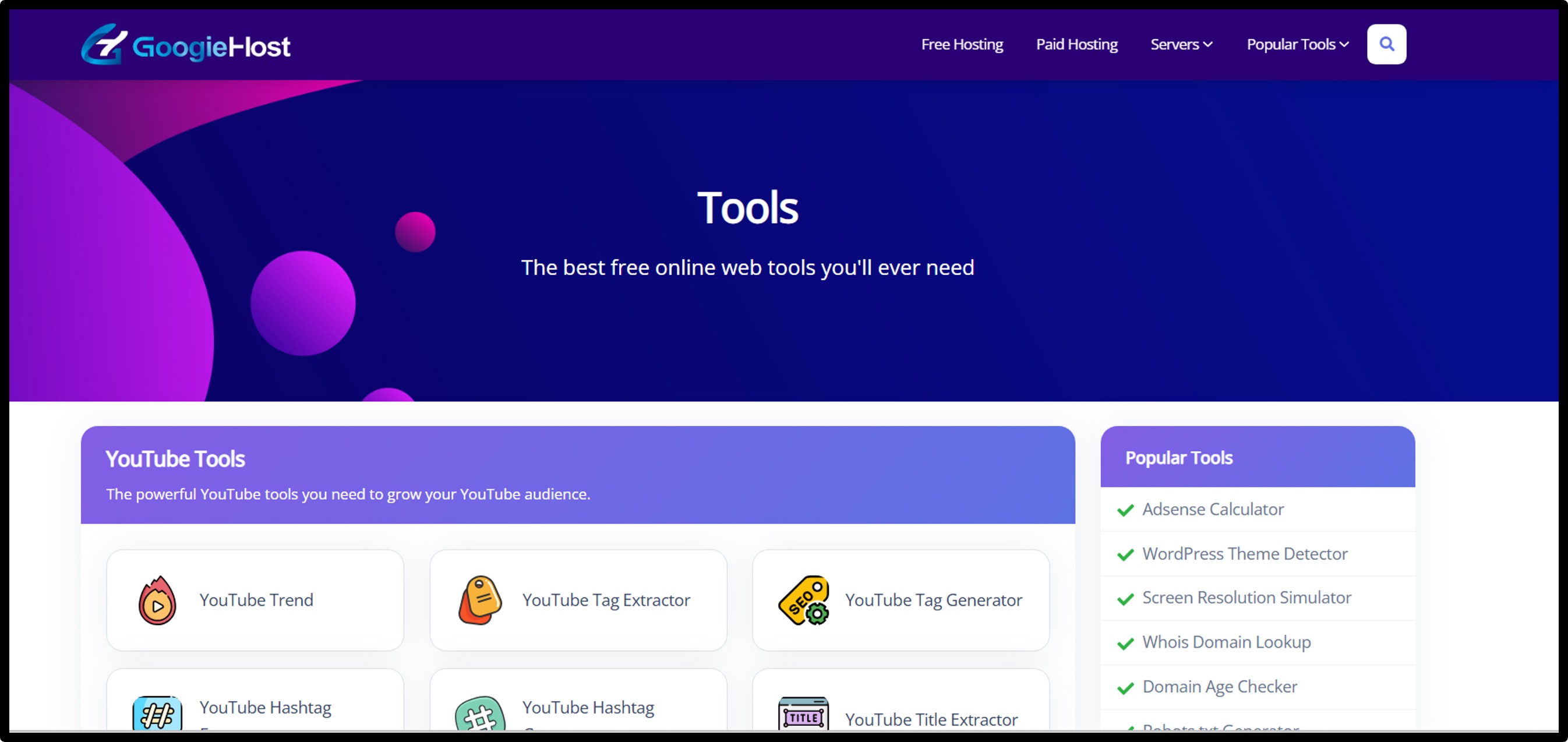
- Open the YouTube Tag Extractor. (You don’t need to sign up or create an account to use the basic features)
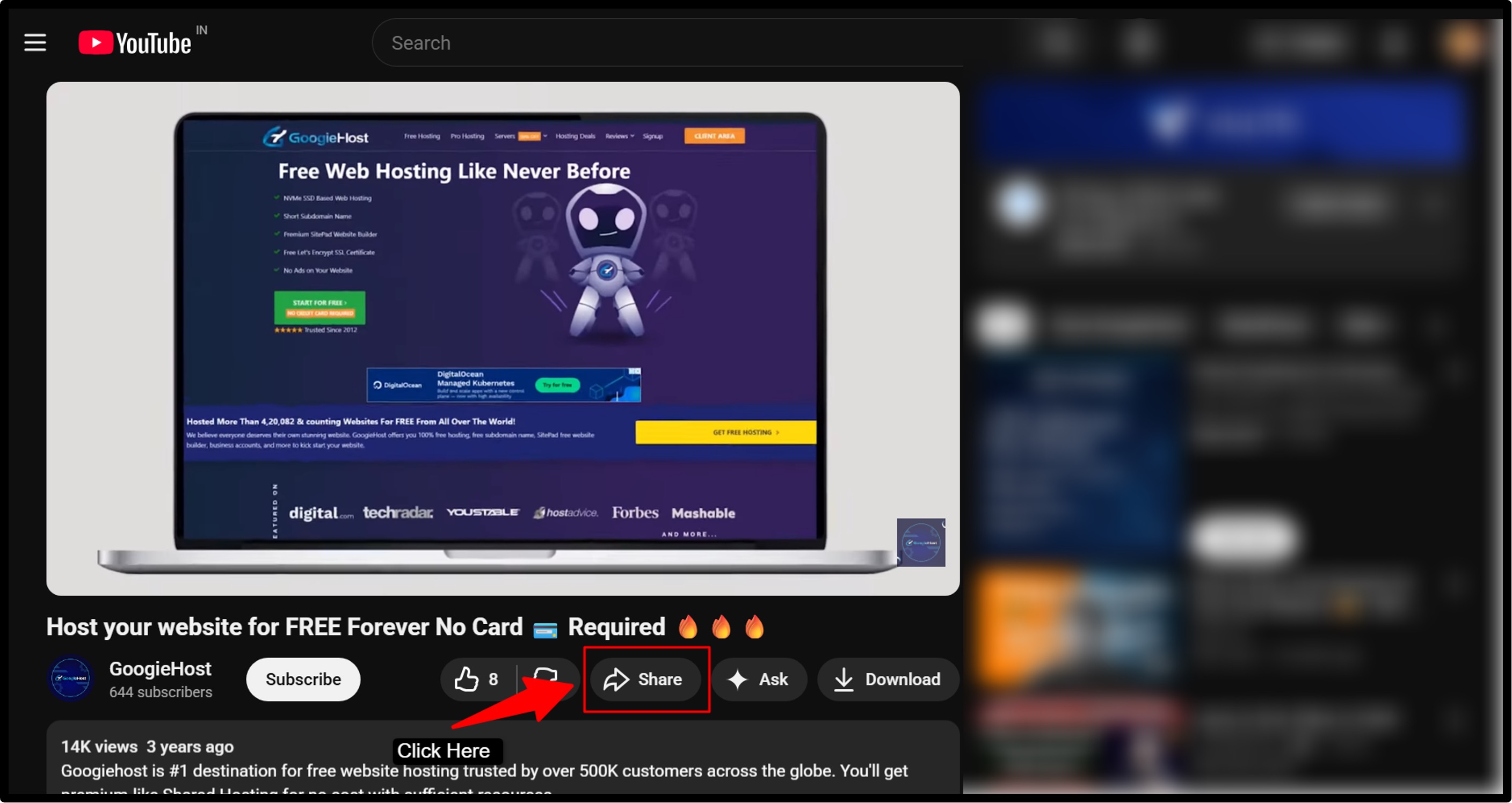
- Next, grab the link to the YouTube video you want to check out (It could be a competitor’s viral video, a trending Short, or any video you’re curious about) >> Go to your YT video >> Click the Share button >> Copy the Video Link provided at the bottom.
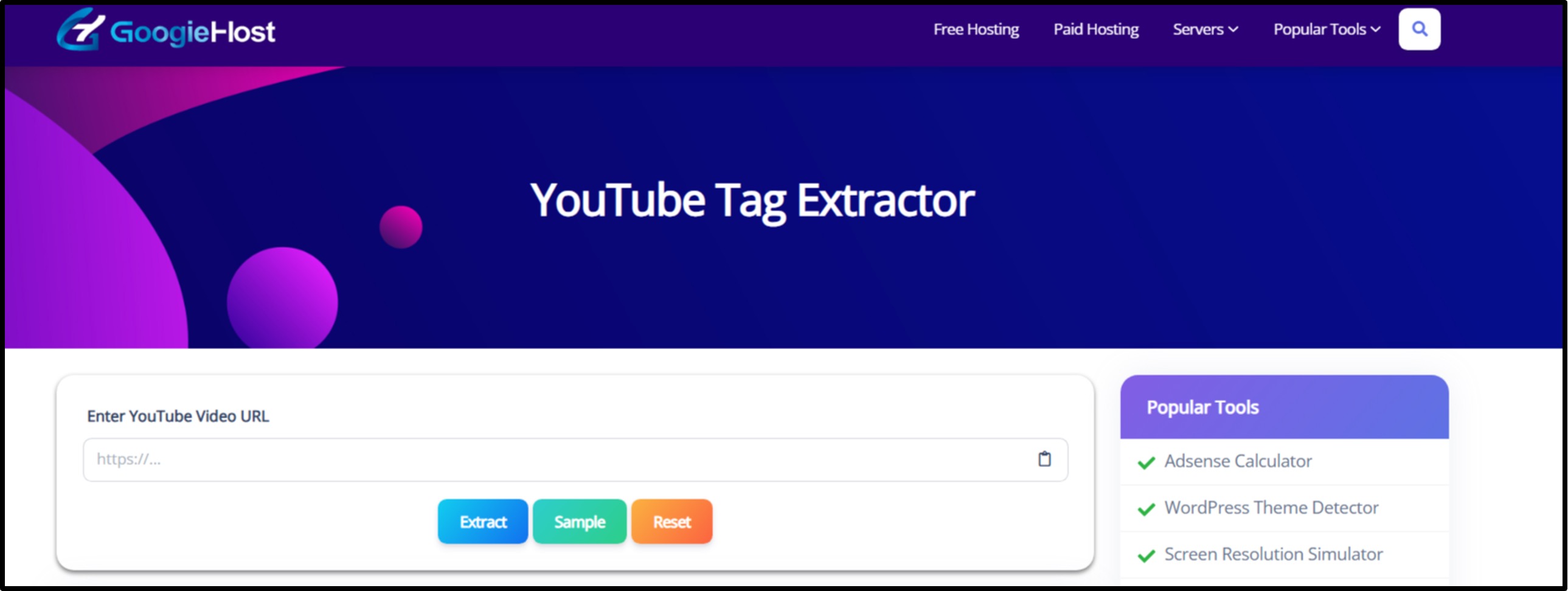
- Now, paste that video URL into the tool’s input box and click “Extract.” That’s it.
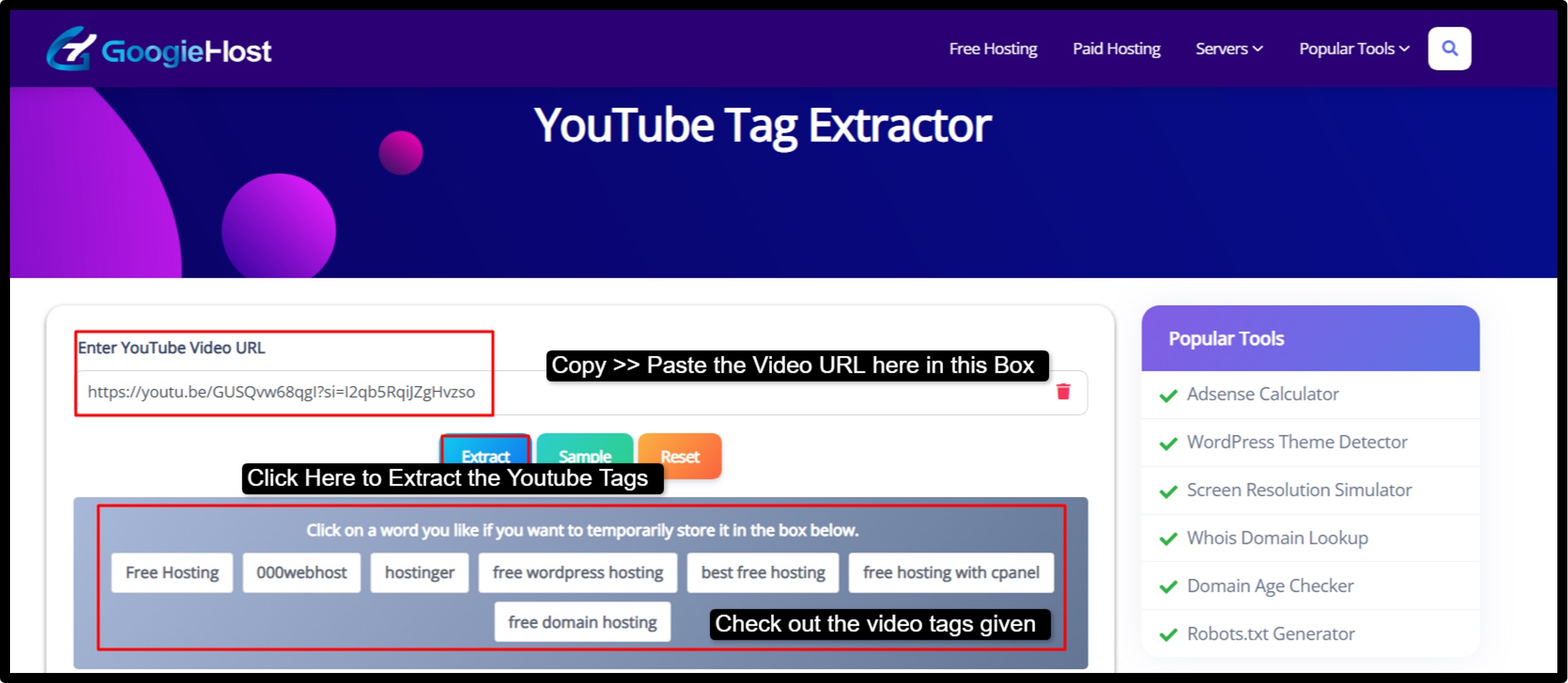
- In just a few seconds, the tool pulls up the full list of tags used in that video.
In many cases, you’ll also see extra info like how competitive those tags are, which helps you choose smarter keywords.
Now, from there, you can copy the tags you like or export the whole list if you want to save them for later.
- Finally, head to YouTube Studio >> Open your video >> Go to “Video details >> Paste the tags into the tags section. And boom! You’re done.
That’s all it takes to extract tags from YouTube videos and use them to give your content a better shot at getting discovered
Pros and Cons of YouTube Tag Extractor
Every tool has upsides and downsides. Let's break it down for YouTube Tag Extractor.
+Pros
- Free and Easy to Use: You don’t have to pay or sign up or deal with annoying limits. Just open the tool and start using it right away.
- Gives You a Competitive Edge: You can check out what your competitors are doing and use that info to improve your own strategy.
- Beginner-Friendly Design: The interface is clean and simple, so even first-time users won’t feel lost. You simply need to copy paste the URL and then you’re ready to go!
- Works for All Types of Content: Be it regular videos, Shorts, or even channels, the tool handles it all. It works for all kinds of video niche.
- Saves You a lot of Time: There’s no need to see the source code or doing things the hard way. Just simply paste a link and get the tags in seconds.
- Helps with YouTube SEO: You get to see which keywords are actually working, making it easier to optimize your videos and improve rankings.
-Cons
- Only Works on Public Videos: If a video is private or unlisted, the tool won’t be able to extract tags from it.
- Tags Aren’t Everything: Tags help, but they won’t magically make bad content go viral. You still need good titles, thumbnails and solid videos.
- Occasional YouTube Updates Can Cause Issues: If YouTube changes something on their end, the tool might have short downtimes now and then.
- Free Version Has Basic Data: You’ll get solid insights for free, but deeper analytics usually come with premium features.
So, if you’re looking for the best free YouTube tag extractor tool, this one checks most of the boxes, especially for creators who want quick results.
Benefits of Using YouTube Tag Extractor for Different Users
The cool thing about a YouTube Tag Extractor is that it helps different people in different ways. We’ve covered how this tool helps Content Creators, Digital Marketers, Businessmen & Educators:
- Digital Marketers: Marketers love this tool because it shows exactly what competitors are targeting. By analyzing those tags, you can fine-tune campaigns, improve ad targeting and make your videos way more relevant.
- Business Owners: For businesses, it’s a smart way to spot trends early. Extracting tags like “AI tools 2025” helps you understand what people are searching for and create content that lines up with current demand.
- Educators and Coaches: If you teach online, this tool helps you find popular keywords for tutorials and lessons. Tags like “online learning hacks” can help your videos reach more students who are actively looking for help.
- Content Creators: If you make YouTube videos, this tool is a Jackpot for you. You can pull tags from viral or trending videos and use them as inspiration for your own content. For example, a fitness creator might discover tags like “home workout tips” and use them to reach the right audience.
It doesn’t matter what role you perform, this tool helps you make smarter YouTube SEO decisions using real data.
Why YouTube Tag Extractor Boosts Your SEO and Visibility
YouTube Tags play a big role in YouTube SEO. They help YouTube understand what your video is about and who it should show it to.
The problem is that most people guess their tags and that rarely works.
A YouTube Tag Extractor shows you tags that are already proven to perform well. That includes long-tail keywords like “how to extract YouTube tags for beginners,” which are easier to rank for and attract the right viewers.
The tool also helps you find low-competition, high-search tags so you can target smaller and more focused audiences instead of fighting everyone else. Over the years, I’ve seen YT channels double their views just by copying smart tag patterns from successful videos.
For best results, use those tags as keywords in your title, description and even your thumbnail text. When everything aligns well, YouTube understands your content better and that leads to more views, longer watch time and higher engagement.
Real-Life Examples and Case Studies
Let’s talk about real results!
Take Lisa, a beauty creator. She used the tool to pull tags from a popular “summer makeup tutorial” video and added similar tags to her own upload. Within a few weeks, her views jumped by 40%. See! Same content quality, but higher results.
Then there’s Gabriel, a live stream gamer on YouTube. He extracted tags from trending “Roblox update” videos and used them for his reviews. One of his videos blew up and crossed 50,000 views overnight.
Even small businesses are seeing wins. A brand called TechHub analyzed competitor videos and found tags like “best budget gadgets.” They used those keywords in their content, which led to more site traffic, and more sales.
These examples show that when you use the right tags, real growth follows.
Comparing YouTube Tag Extractor to Other Tools
So how does GoogieTools’ YouTube Tag Extractor stack up against other options out there?
Old-school methods like manually checking page source technically work, but they’re slow and honestly not worth the effort anymore.
Compared to tools like TubeBuddy, this one stays aligned. There’s no unnecessary login requirements and features that are provided, just clean and fast tag extraction.
VidIQ offers deep analytics, which is OK, but if you’re just looking to grab tags quickly, this tool is faster and totally free.
If you’re searching for a YouTube tag extractor online that’s simple, this tool (Youtube Tag Extractor) gets the job done.
Advanced Tips for Maximizing YouTube Tag Extractor
Want to take things up a notch? Here are a few smart ways to use the tool like a pro.
- Start by combining extracted tags with your own keyword research. Manual brainstorming really helps in this case.
- Pay special attention to the first few tags, since YouTube gives them more weight.
- Don’t rely on just one video! Extract tags from multiple top-performing videos and mix them together to create unique keyword combos.
- Make it a habit to check trending videos in your niche and pull fresh tags every week. Staying current really matters.
From my experience, the best results come from mixing broad tags with specific ones, like pairing “gaming” with “Fortnite tips 2026.” That way, you reach a wide audience while still targeting people who know exactly what they want.
Used the right way, this tool can seriously level up your YouTube strategy
FAQs About YouTube Tag Extractor
Quick hits on common questions.
Q1. Is it free?
Ans. Yes! The YouTube Tag Extractor on GoogieHost.com is completely free to use. You don’t need to sign up to extract tags from public YouTube videos.
Q2. How many tags can I extract?
Ans. There’s no stated limit! You can extract all tags embedded in any publicly available YouTube video by simply pasting its URL.
Q3. Does it work for Shorts?
Ans. Absolutely! It works perfectly for YouTube Shorts as well, including tag extraction for short-form videos.
Q4. Can it improve monetization?
Ans. Indirectly, yes. By revealing effective tags used by top-performing videos, you can optimize your own tags for better discoverability, potentially leading to more views, watch time, and higher ad revenue.
Why Choose GoogieTools' YouTube Tag Extractor Over Competitors
GoogieHost.com’s YouTube Tag Extractor is a helpful tool for anyone who wants to grow on YouTube. It lets you see the tags that successful videos are using so you can understand how they get more views.
The tool is free and works in seconds. Just paste a public YouTube video link, even Shorts, and it shows you all the hidden tags. This helps you learn how top creators make their videos easier to find.
When you use similar (or better) tags on your own videos, you give them a better chance to show up in YouTube search and recommendations.

Aman Singh
CREATIVE HEAD
Enjoy the little things in life. For one day, you may look back and realize they were the big things. Many of life's failures are people who did not realize how close they were to success when they gave up.