
YouTube Hashtag Extractor






Starting a YouTube channel can be exciting, but growing it takes time and effort. Many content creators spend hours researching on topics, editing videos and then, designing thumbnails, hoping that they could reach more viewers. But even after putting in so much time and effort, videos struggled to get attention.
It’s really frustrating to work hard and still see very few views.
If you look at your competitor’s YouTube channel, you'll notice how their videos get strong engagement. The reason is simple, they are using the right YouTube hashtags. But, there’s one problem! Finding the right YouTube hashtags manually takes a lot of time.
That’s why we’ve brought to you GoogieHost’s YouTube Hashtag Extractor, a practical tool that makes the process of choosing hashtags quick and easy.
In this blog, we’ll talk about the YouTube hashtag extractor tool and how it works. You’ll also learn how it can help improve your video reach and save you valuable time. This guide is helpful for new creators as well as experienced digital marketers who want a better way to find powerful hashtags.
Let’s explore how this tool can make YouTube optimization simple.
What is a YouTube Hashtag Extractor?
A YouTube Hashtag Extractor is a useful online tool that helps you collect hashtags directly from YouTube videos or channels. It quickly scans video descriptions, titles and comments to gather relevant trending hashtags in one place. This saves you a lot of time instead of searching and writing them down on your own.
Why is this important? See! Hashtags on YouTube help your videos reach the right audience. They make it easier for people to find your content when they search for specific topics.
For example let’s say, if you create videos about “How to reduce Belly Fat,” extracting hashtags from popular videos in the same category can help you understand what works best.
The YouTube Hashtag Extractor from GoogieTools is simple to use and designed especially for content creators. It helps you find effective hashtags in a matter of seconds. With the right hashtags, you can improve your video visibility and grow your channel faster.
Why You Need a YouTube Hashtag Extractor in Your Toolkit
Imagine getting more views on your videos just by using the right hashtags.
It may sound surprising, but it is completely possible with the help of the right tool. Some creators out there do not take hashtags seriously. But the thing is that it is useful for Instagram and also for YouTube as well. Once you start using proper hashtags, you’ll be able to see real improvement in your views and subscribers.
This tool is very helpful for anyone who wants better results on YouTube. It helps you check what hashtags successful channels are using, find trending tags and plan your content in a smarter way.
Here are the main benefits if you use YouTube hashtag extractor tool:
- Competitive Edge: The tool lets you see which hashtags other popular creators are using. This helps you understand what works in your niche and follow a proven approach.
- Time-Saver: Instead of searching for hashtags one by one, the tool collects them for you in seconds. This saves a lot of effort and makes your work faster and easier.
- SEO Boost: Using the right hashtags helps YouTube understand your video better. This improves your chances of appearing in search results and reaching more viewers.
Key Features of GoogieTools' YouTube Hashtag Extractor
The YouTube Hashtag Extractor from GoogieTools is designed to make hashtag research fast and easy. It helps creators find the right hashtags without any confusion. Let’s look at the main features in a simple way:
- URL-Based Extraction: All you need to do is paste the link of any YouTube video or channel. The tool instantly collects all the hashtags used in the title and description.
- Bulk Processing: You can enter multiple video or channel links at the same time. This is very useful when you want to research hashtags from an entire playlist or several videos together.
- Mobile-Friendly Interface: The tool works smoothly on phones, tablets and computers. So, you can extract hashtags anytime and from anywhere.
- Trend Analysis: The tool shows which hashtags are popular and trending. This helps you choose tags that can bring more traffic to your videos and avoid ones that are not effective.
- Export Options: After extracting hashtags, you can easily download the results in CSV or text format. This makes it simple to save them and use them later while planning your content.
- Custom Filters: You can organize hashtags based on relevance, length, or how often they are used. This helps you focus only on the most useful and powerful tags for your videos.
With all these features, it helps you plan better and improve your YouTube strategy. If you want an easy way to find and use the best hashtags for your videos, this tool makes the whole process simple (No sign-ups required also).
How to Use the YouTube Hashtag Extractor: A Step-by-Step Guide
Using the YouTube Hashtag Extractor from GoogieTools is very simple. You don’t need any technical skills to get started. Just follow these easy steps to extract hashtags from YouTube videos:
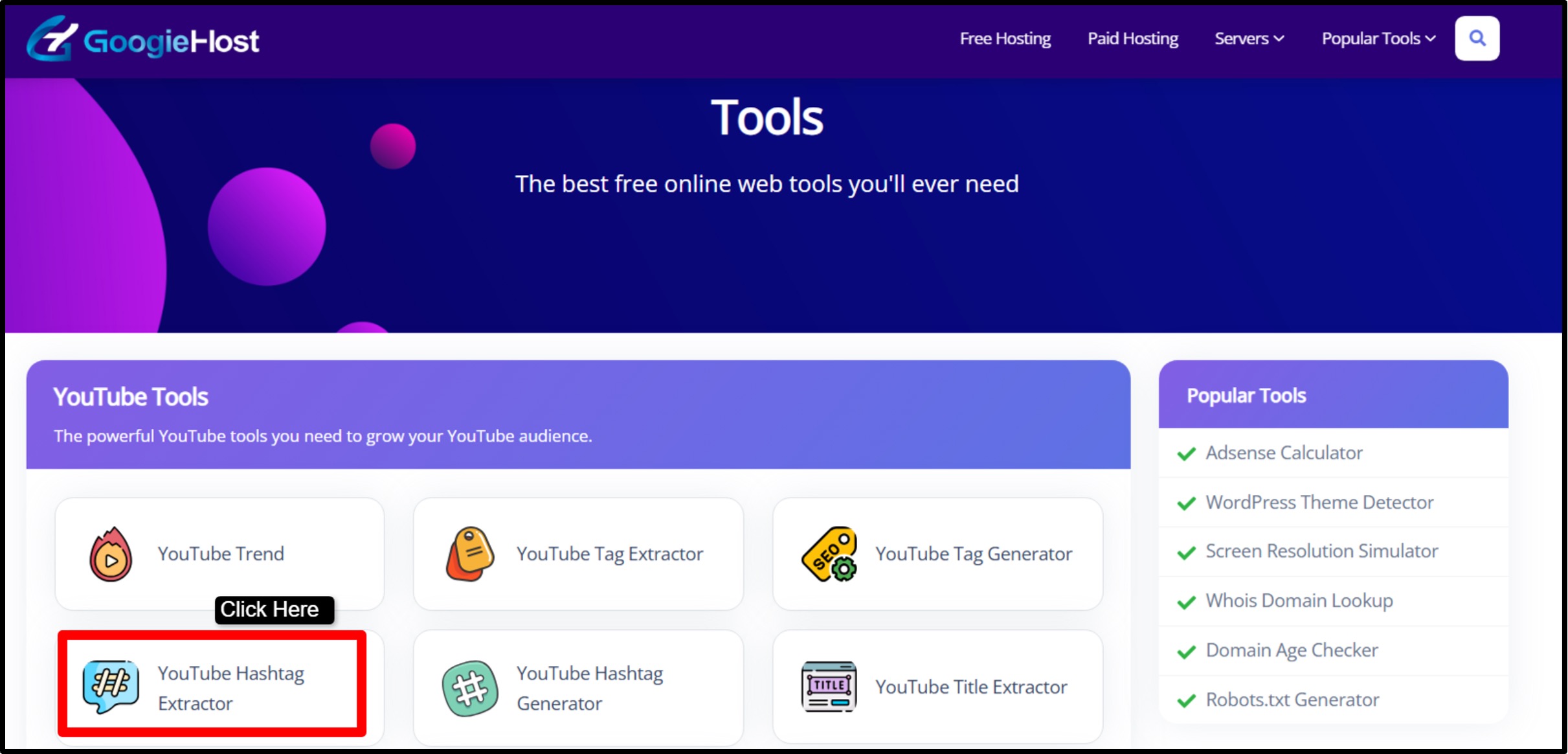
Step 1) Visit googiehost.com/tools/ >> From the list of tools, find and open the “YouTube Hashtag Extractor.”
Step 2) Copy the link of the YouTube video you want hashtags from. Paste that link into the input box on the tool page >> and then, click Extract
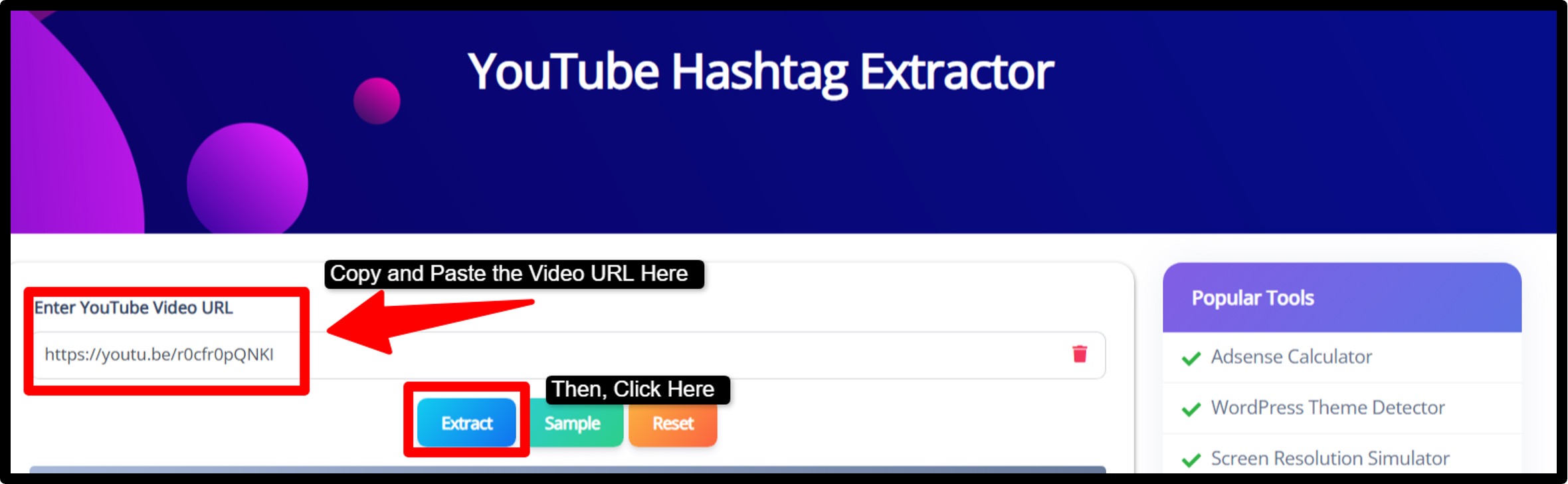
Step 3) After you click the Extract button >> Within a few seconds, the tool will collect and display all the hashtags from that video.

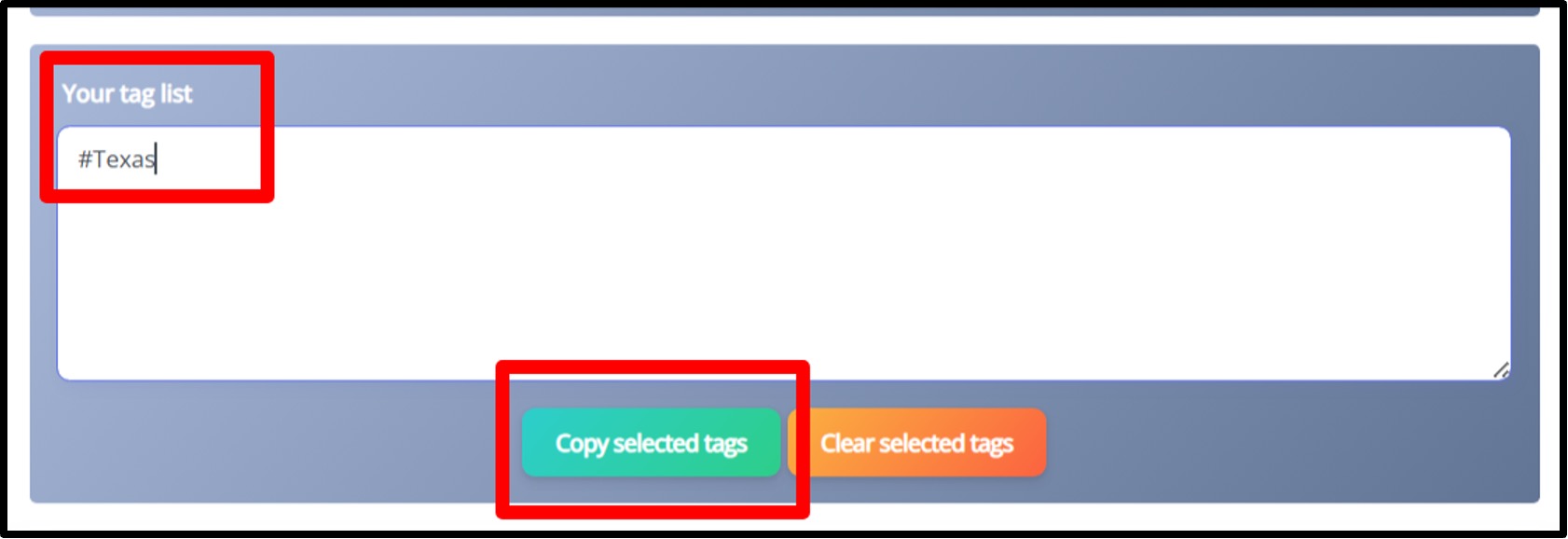
Step 4) Like this, check the hashtags of other similar popular trending videos and copy paste the tags in the Box given below.
One Helpful Tip:
You can also use these hashtags along with YouTube Analytics to see which ones work best for your channel.
This simple method helps you choose better hashtags and improve your video rankings over time.
Pros and Cons of Using a YouTube Hashtag Extractor
Like any tool, the YouTube Hashtag Extractor has both good sides and not-so-good sides.
Pros:
- Saves a lot of time by collecting hashtags in seconds.
- Gives accurate hashtags directly from real YouTube videos.
- Free to use, which is great for new creators.
- Helps you discover trending and useful hashtags easily.
- Very simple and easy to use for everyone.
- Works well with other SEO and YouTube tools.
Cons:
- The results depend on the quality of the URLs you enter.
- It only works with public YouTube videos and channels.
- New users may copy hashtags without understanding them.
- You need an internet connection to use the tool.
Benefits of Optimizing Hashtags with This Tool
Hashtags do more than just increase views! It helps you connect with the right audience. With the YouTube Hashtag Extractor from GoogieTools, you can easily find hashtags that match your niche. When you extract hashtags from popular videos, you get a clear idea of what is already working and what people are searching for.
- Using better hashtags means more people can discover your videos. More discovery leads to more impressions, clicks, and watch time. For channels that earn money from YouTube, this can also mean higher revenue.
- If you start using properly extracted optimized hashtags, your videos would jump from around 100 views to more than 5,000 views in just a day or two. That shows how powerful the right strategy can be.
- The tool is also very useful for long-tail keywords. These are detailed search phrases like “how to use YouTube hashtag extractor for beginners.” Such hashtags help your videos rank higher on both YouTube and Google, bringing more organic traffic to your channel.
Real-World Applications and Case Studies
Let’s take a simple example.
Imagine you run a fitness YouTube channel. You can use this tool to extract hashtags from top fitness creators. You might find useful tags like “#HomeWorkout” or “#FitnessMotivation.” Then you can use similar hashtags in your own videos to reach the same audience.
You can even use this method on your tech channel as well. You can extract hashtags from popular competitor videos and add them to your content. After you use more focused hashtags, your search rankings can get improved, views increased, and more people can ultimately subscribe to your channel.
This tool is not only for individual creators. Many agencies also use it to plan better YouTube campaigns for their clients. It works well for almost every niche, like gaming, education, beauty, technology and more.
Comparing GoogieTools' YouTube Hashtag Extractor to Alternatives
There are many tools available today that claim to help with YouTube growth and optimization.
However, not all of them are simple or easy to understand. GoogieTools’ YouTube hashtag extractor is different and unique because it focuses on one main job, finding and extracting hashtags quickly and accurately.
Some popular tools like TubeBuddy and VidIQ also provide hashtag suggestions, but they come with many extra features that can feel confusing, especially for beginners. They often require paid plans to unlock useful options, which may not be suitable for new creators.
GoogieTools, on the other hand, is beginner-friendly. You don’t need to learn complicated settings or spend money to get results. It gives you exactly what you need, relevant hashtags in just a few seconds.
Tips for Maximizing Your Hashtag Strategy
Using a tool is helpful, but using it the right way makes all the difference. Here are some practical tips to help you get the best results from your hashtag strategy:
- Follow trends regularly: YouTube trends change quickly. By extracting hashtags from recent and popular videos, you can stay updated with what people are searching for right now. This helps your videos stay relevant.
- Don’t overuse hashtags: Adding too many hashtags can make your video look spammy. It is better to use a small number of strong and relevant hashtags instead of filling the description with unnecessary ones.
- Track your results: After using hashtags, check your YouTube Analytics to see how your videos are performing. This will help you understand which hashtags bring more views and engagement.
- Combine hashtags with good SEO: Hashtags work best when they are used along with strong titles, descriptions and keywords. A well-optimized video has a much better chance of ranking higher on YouTube.
- Be consistent: Success on YouTube doesn’t happen overnight. When you consistently use the right hashtags and improve your strategy over time, you will slowly see better results in views and subscribers.
- Use a mix of hashtags: Always try to use both short and long-tail hashtags. Short hashtags help you reach a broader audience, while long-tail hashtags help you target specific viewers who are more likely to be interested in your content.
By following these simple tips, you can make your YouTube optimization much more effective.
Frequently Asked Questions About YouTube Hashtag Extractor
Q1. Is the YouTube Hashtag Extractor free to use?
Yes, the YouTube Hashtag Extractor on GoogieHost.com is completely free. You do not need to sign up or pay any subscription to use it.
Q2. Can I use this tool on my mobile phone?
Yes, the tool works perfectly on mobile phones, tablets and computers. You can use it easily on any device with an internet browser.
Q3. How accurate are the extracted hashtags?
The tool is very accurate. It collects real hashtags directly from YouTube video titles and descriptions in real time.
Q4. Can I extract hashtags from entire playlists?
No, the tool extracts hashtags only from single video URLs. It does not support playlist extraction at the moment.
Q5. Is there any limit on hashtag extraction?
No, there is no fixed limit. You can extract all available hashtags from any public YouTube video as many times as you want.
Q6. Do I need any technical skills to use it?
No, You do not need any technical skills to use GoogieTool’s YouTube hashtag extractor. This tool is very simple and beginner-friendly. Anyone can use it without any technical knowledge.
Why Choose GoogieTools' YouTube Hashtag Extractor Over Competitors
The YouTube hashtag extractor from GoogieHost.com is a simple tool that helps you find the exact hashtags used in any public YouTube video, including YouTube Shorts. It is completely free to use and does not require any sign-up or special skills. This makes it a top pick for beginners.
One of the biggest advantages of using this tool is how easy and fast it is. You just need to paste a video link, and within seconds, you get a full list of hashtags used in that video. Many other tools are complicated or filled with unnecessary features. But GoogieTools focuses only on what matters most, quick and accurate hashtag extraction.
Another reason to choose GoogieTools is its user-friendly design. The tool works smoothly on mobiles, tablets, and desktops. You can use it anytime and anywhere without any hassle. It is perfect for creators who want quick results.
If you are looking for a free, reliable, and easy way to find the best hashtags for your videos, GoogieTools’ YouTube hashtag extractor is one of the best options available today.

Aman Singh
CREATIVE HEAD
Enjoy the little things in life. For one day, you may look back and realize they were the big things. Many of life's failures are people who did not realize how close they were to success when they gave up.