
YouTube Channel ID



Having a Youtube Channel is not important, if you do not know about your YouTube Channel ID. Many tools, APIs, analytics platforms and tool integrations require the exact Channel ID to connect your channel properly.
However, many creators either do not know about it or at times they struggle to find it quickly.
To make it easier, we have created a YouTube Channel ID Finder tool (by GoogieHost team) that helps you get your Channel ID in seconds. If you are a YouTube content creator, this is a tool you definitely need to know about, so keep reading to learn how it works.
In this guide, we will show you how to find your YouTube Channel ID step-by-step using our tool. The process is simple. To make things even easier, we have also added screenshots for every step so you can clearly see what to do. Just follow the instructions carefully and you will get your Channel ID without confusion.
We have even personally tested this tool to make sure it works smoothly and gives accurate results for creators.
So if you want to learn how to quickly find your YouTube Channel ID, continue reading and follow the step-by-step method below.
What is a YouTube Channel ID?
YouTube Channel ID is a unique alphanumeric code that identifies a YouTube channel on the platform. It is different from the channel name, handle, or custom URL. This ID acts as a permanent identifier for every channel and usually begins with “UC” followed by a series of letters and numbers.
It is not like channel names or usernames that can change over time. The Channel ID remains constant. This makes it important for many backend uses such as YouTube API integration, analytics tracking, developer tools and platform integrations that require an exact channel identifier.
The YT Channel ID plays a very important role for youtube creators and developers, in accessing channel data and connecting external tools.
Knowing the YouTube Channel ID helps ensure accurate integrations and enables advanced features that depend on a stable and unique channel reference.
Why You Need a YouTube Channel ID Finder in 2026
See! YouTube content creation is getting more competitive and data-driven day by day.
With billions of users on the platform, creators rely on tools, analytics platforms, and integrations to manage and grow their channels. Many of these tools require a YouTube Channel ID to connect with your channel. Finding this ID manually can be confusing and time-consuming, especially for new creators.
A YouTube Channel ID Finder tool helps simplify this process. Instead of searching through complicated steps, creators can quickly get the exact Channel ID by simply entering their channel link.
This saves time, reduces errors, and makes it easier to connect your channel with tools such as analytics platforms, APIs, automation tools, and SEO tracking software.
For creators who want to grow their channel using data and integrations, knowing the YouTube Channel ID is important. A reliable finder tool ensures you get the correct ID instantly and helps you set up different services without technical confusion.
If you use tools for analytics, integrations, or development, a Channel ID finder becomes an essential part of your workflow.
Key Features of GoogieTools' YouTube Channel ID Finder
The GoogieTools YouTube Channel ID Finder is designed to make the process simple and fast for creators. The tool focuses on accuracy and ease of use, so both beginners and experienced YouTubers can quickly find their Channel ID without technical steps.
Simple URL Input
Just paste your YouTube channel URL into the tool, and it instantly extracts the correct Channel ID. No technical steps or complex settings required for creators.
Multiple Input Options
The tool supports different inputs such as channel URL, username, channel name, or video link. This flexibility helps creators quickly find the Channel ID in various situations.
Instant Results
The YouTube Channel ID is generated within seconds after submitting the link. This saves time and allows creators to quickly copy and use the ID.
Smart Error Detection
The tool automatically detects invalid or incorrect YouTube links. It provides helpful suggestions so users can correct the input and successfully find their Channel ID.
Privacy-Focused Tool
User data is not stored or tracked while using the tool. This ensures privacy and keeps channel information secure during the Channel ID lookup process.
Mobile-Friendly Interface
The tool works smoothly on mobile phones, tablets, and desktops. Creators can easily find their YouTube Channel ID anytime without needing a computer.
Completely Free to Use
GoogieTools offers this YouTube Channel ID Finder completely free. Creators can use the tool unlimited times without registration, subscriptions, hidden fees, or ads.
How to Use the YouTube Channel ID Finder: Step-by-Step Guide
Follow the simple steps below to quickly find your YouTube Channel ID using the GoogieTools YouTube Channel ID Finder.
Step1) Open the Tool >> Go to GoogieTools.com and search for YouTube Channel ID Finder >> Open the tool page to begin the process.
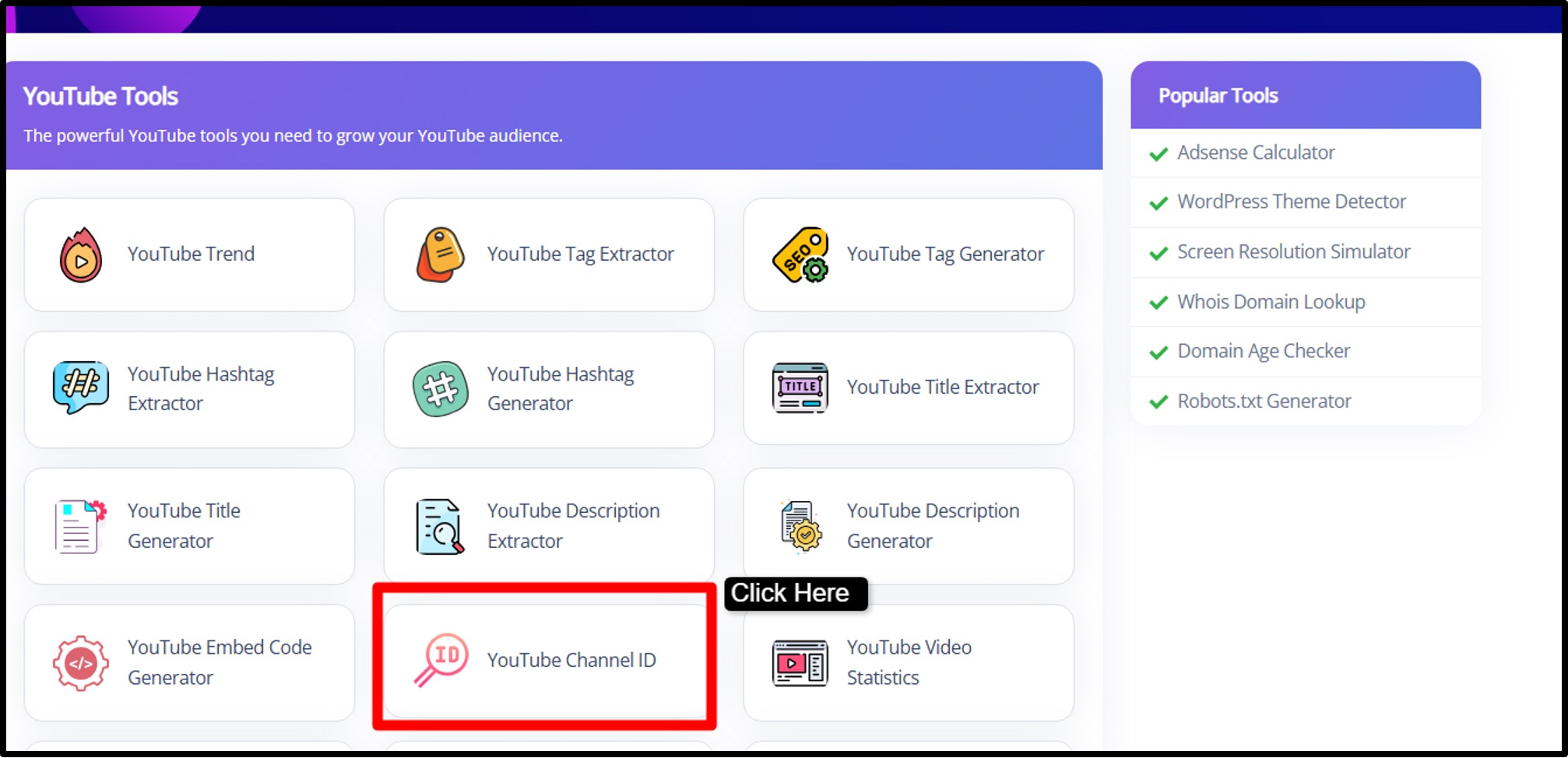
Step2) Enter Your Channel Information >> Copy your YouTube channel URL, handle link >> paste it into the input box provided in the tool.
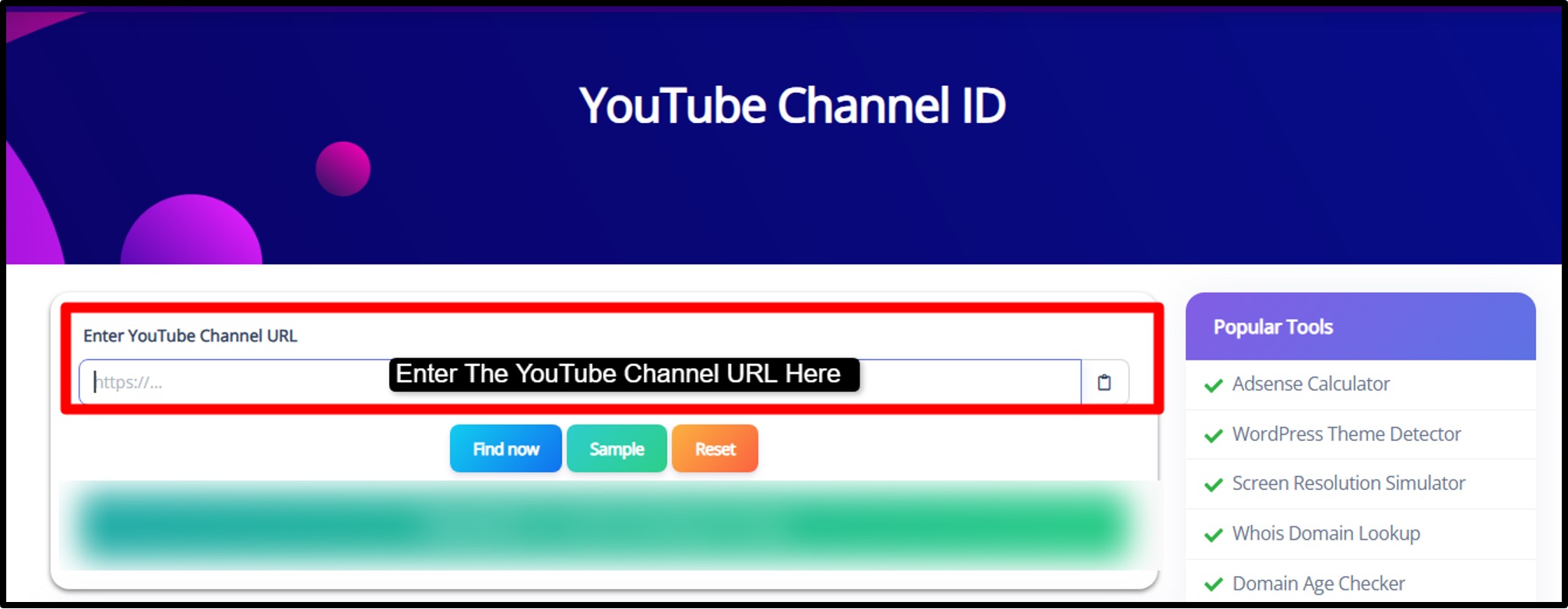
Step3) Click “Find Now” >> After pasting the link, click the Find Now button. The tool will process the link and extract the correct Channel ID.
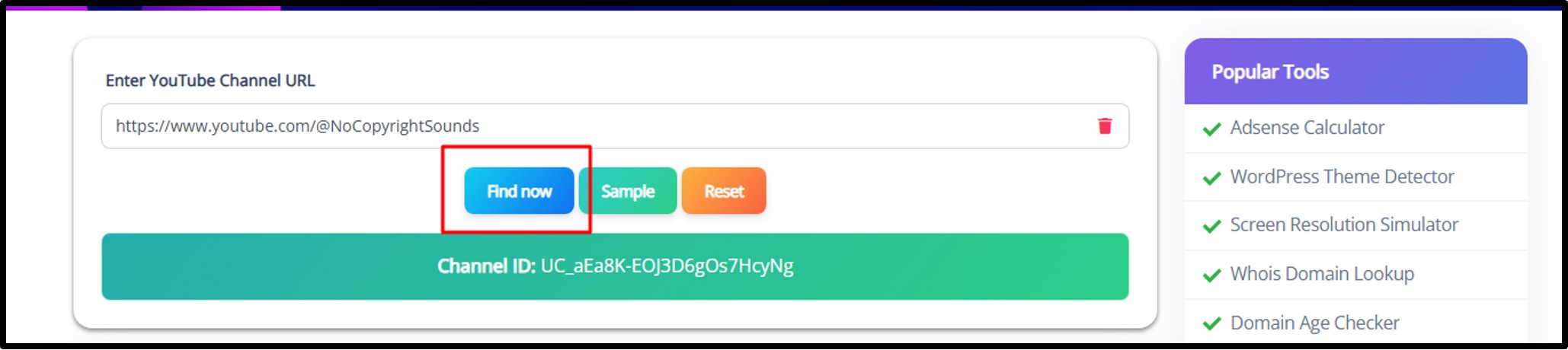
Step4) Get Your Channel ID >> Within a few seconds, the tool will display your YouTube Channel ID on the screen.
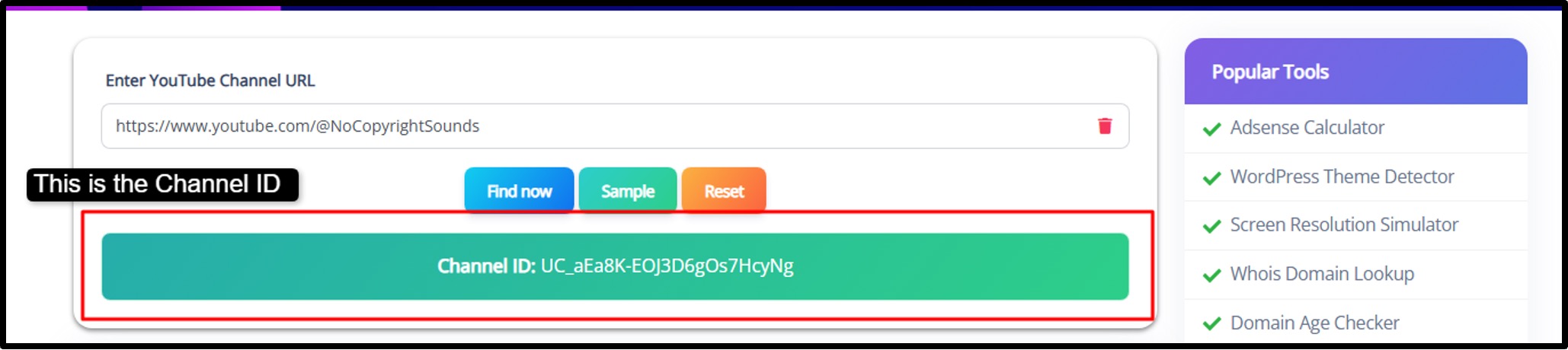
Step5) Copy and Use the ID >> Copy the Channel ID and use it wherever needed, such as YouTube API tools, analytics platforms, integrations, or developer tools.
|
If your channel has a custom URL or handle, using a video link from your channel can also help the tool easily detect the correct Channel ID. |
Pros and Cons of Using a YouTube Channel ID Finder
Let's balance the scales with an honest look.
Pros:
- Retrieves IDs instantly, no manual digging.
- Intuitive for non-tech users.
- Supports APIs, analytics, and more.
- No hidden costs or limits.
- Reduces errors in integrations.
- Enables better tracking for channel optimization.
Cons:
- Doesn't work for other platforms like Twitch.
- Offline access isn't available.
- Garbage in, garbage out, wrong URL means no ID.
- One channel at a time for now.
Benefits of Knowing Your YouTube Channel ID
Knowing your YouTube Channel ID can make many things easier when managing or growing a YouTube channel. Many tools, analytics platforms, and integrations require this unique ID to connect correctly with your channel. When you have the correct Channel ID, it becomes much easier to track performance, automate tasks, and use advanced YouTube features. For creators who want to grow with data and automation, understanding and using the Channel ID can be very useful.
- API Integrations
Your YouTube Channel ID helps connect your channel with tools and APIs. This allows creators to automate tasks, collect channel data, build applications, and integrate platforms that improve workflow and content management.
- Analytics Tracking
Using the Channel ID makes it easier to connect your channel with analytics platforms like dashboards or reporting tools. This helps creators track video performance, audience growth, engagement, and content trends.
- Custom Embeds for Websites
With the Channel ID, creators can embed videos, playlists, or entire channels on websites. This helps bloggers, businesses, and creators showcase their content and increase video visibility.
- Monetization Opportunities
Many affiliate platforms, advertising networks, and marketing tools require a Channel ID to verify your YouTube channel. Having it ready helps creators quickly connect monetization platforms and partnerships.
- Better Channel Optimization
The Channel ID helps tools collect accurate channel data. Creators can analyze performance metrics, identify growth opportunities, and make better content decisions based on reliable information.
Common Use Cases for YouTube Channel ID Finder
A YouTube Channel ID Finder is useful in many different situations. Let’s say someone is a content creator or business owner, this tool helps quickly identify the unique Channel ID needed for integrations and analytics. Instead of searching manually, the tool simplifies the process and helps users access the correct channel data without confusion.
Content Creators
YouTube creators often use the Channel ID to connect their channel with email marketing tools, automation platforms, and analytics dashboards. This helps manage subscribers, track engagement, and improve audience growth strategies.
Developers
Developers use the Channel ID when building applications that interact with YouTube data. It allows apps and scripts to fetch channel information, video details, and statistics using the YouTube API.
Marketers
Digital marketers use Channel IDs to track competitor channels and analyze performance data. This helps compare growth, engagement trends, and content strategies to improve marketing campaigns.
Bloggers and Website Owners
Bloggers often use the Channel ID to embed YouTube playlists, videos, or full channel feeds on their websites. This helps increase engagement and keeps visitors interacting with video content.
Businesses and Brands
Businesses use the Channel ID to monitor brand channels, track video performance, and integrate YouTube data with marketing dashboards. This helps teams analyze results and improve their video strategy.
Tips for Using YouTube Channel ID Effectively for SEO and Growth
Using your YouTube Channel ID correctly can help improve channel management, analytics tracking, and overall growth strategy. When combined with the right tools and platforms, the Channel ID helps creators collect accurate data, automate workflows, and optimize content performance.
A few simple practices can help creators get better value from this unique channel identifier.
Connect It With Analytics Tools
Use your Channel ID to connect with analytics platforms or dashboards. This allows you to track video performance, audience behavior, and engagement metrics that help improve your content strategy.
Use It in Custom Scripts or Automation
Developers and advanced creators can use the Channel ID in scripts or automation tools. This helps generate reports, collect channel data, and automate repetitive tasks.
Keep Your Channel ID Secure
While the Channel ID is public on YouTube, it is still important to use it carefully in integrations. Avoid sharing it unnecessarily in unknown tools or platforms.
Combine It With Other Creator Tools
Using the Channel ID along with other YouTube tools such as embed generators, analytics dashboards, and automation tools can help improve content distribution and channel optimization.
Verify It When Connecting Tools
Whenever you connect a new tool or integration, always verify that the correct Channel ID is used. This ensures accurate data tracking and prevents errors in analytics.
Use It for Better SEO Tracking
Channel IDs help tools track detailed performance metrics. This information helps creators understand which videos perform best and optimize future content for better visibility and growth.
Frequently Asked Questions (FAQs) About YouTube Channel ID Finder
Quick answers to common queries.
Q1. How do I find my YouTube Channel ID without a tool?
You can find it directly in YouTube:
- Log in to YouTube and click your profile picture.
- Go to Settings → Advanced Settings.
- Under "Channel," you’ll see your Channel ID.
Q2. Is the tool free forever?
Yes, the YouTube Channel ID finder tool is completely free to use, with no hidden charges or subscriptions.
Q3. Can I find IDs for any channel?
Yes, you can find the Channel ID for any public YouTube channel. However, you cannot access IDs of deleted or fully private channels.
Q4. Why does my API need the Channel ID?
APIs use the Channel ID to identify a specific channel. This ensures you can fetch data like videos, playlists, or statistics from the correct channel without confusion.
Q5. Is it safe?
Yes, it’s safe. The tool only fetches public information and does not require your YouTube login or personal data.
Conclusion: Empower Your YouTube Journey with GoogieTools' Channel ID Finder Now
Finding your YouTube Channel ID should not be complicated. With the GoogieTools YouTube Channel ID Finder, creators can quickly get the exact Channel ID without confusion or technical steps. This simple tool helps unlock many possibilities such as API integrations, analytics tracking, automation tools, and better channel management.
We built and tested this tool to make the process fast, accurate, and easy for YouTube creators. Instead of spending time searching through complex methods, creators can simply enter their channel link and get the Channel ID instantly. This helps streamline workflows and makes it easier to connect your channel with different tools and platforms.
If you are serious about growing your YouTube channel and using the right tools, knowing your Channel ID is an important step. So explore the GoogieTools YouTube Channel ID Finder, get your Channel ID in seconds, and start using it to power your analytics, integrations, and channel growth.

Aman Singh
CREATIVE HEAD
Enjoy the little things in life. For one day, you may look back and realize they were the big things. Many of life's failures are people who did not realize how close they were to success when they gave up.