
YouTube Hashtag Generator






Every YouTube creator knows this hard feeling! Hours spent on scripting, hard working on filming, editing, and on designing thumbnails, and then getting only a handful of views after hitting publish.
Hardly any clicks? Really it’s totally frustrating, especially when the content is 100% genuinely valuable. The truth is that great videos alone are not enough. How easily your videos can be discovered on YouTube matters.
In a nutshell, Visibility matters! And that’s where YouTube hashtags are very important.
Hashtags may look small, but they play a very important role in helping YouTube understand what a video is about. When used properly, they improve search visibility and help videos appear in suggested feeds of the viewers. The only challenge for the Youtube creators is to find the right mix of trending and niche-specific hashtags without spending hours researching.
That’s exactly why the best YouTube Hashtag generator becomes a powerful asset for YT creators who want growth without any sort of guesswork.
GoogieTools’ YouTube Hashtag Generator is designed to make that process simple. Instead of random tag stuffing, it delivers well-optimized, searchable hashtags that fits with your video topic and audience intent. Let’s say, you’re wanting to launch a brand-new channel or wanting to scale an established one, the right hashtag strategy can improve reach and overall YouTube SEO performance.
So, let's get started!
What Is a YouTube Hashtag Generator and Why Do You Need One?
A YouTube Hashtag Generator is a smart online tool designed to create relevant, keyword-focused and trending hashtags based on your video topic. Instead of guessing which tags might work, the tool provides well-optimized suggestions that fit with what people are actively searching for.
YouTube is crowded! Millions of videos fight for attention every single day and simply uploading great content is no longer enough. To really become unique, videos need strong discoverability signals, and in this case, hashtags play a really powerful role in that process.
Think of the hashtag generator tool as a shortcut to better YouTube SEO. When the right keyword is entered, like “home workout for beginners” or “easy vegan recipes”, the hashtag generator tool quickly produces a list of highly targeted hashtags that match search intent. These hashtags help YouTube’s algorithm clearly understand the subject and audience of the content.
The clearer the signals, the better the chances of appearing in search results and even hashtag-based discovery feeds.
Now, let’s understand why the YT hashtag generator tool is important. It is important because video visibility drives growth. Strong hashtags can
- Connect a video to similar content
- Improve ranking potential
- Increase impressions
- Attract viewers who are genuinely interested in that topic.
Without optimized hashtags, even high-quality videos get buried under thousands of competing uploads. A YouTube Hashtag Generator removes the guesswork and gives creators a strategic edge, making every upload more searchable and far more likely to reach the right audience.
Key Features of GoogieTools' YouTube Hashtag Generator
This isn’t just another random hashtag tool! It’s built for creators who want real growth and smarter visibility. Let’s break down the features in simple, practical terms so it’s clear how each one actually helps a channel grow.
Keyword-Based Hashtag Suggestions
We simply enter a main keyword related to the video topic and the tool instantly generates a list of relevant, trending hashtags. These suggestions are not random. They are according to what people are actively searching for on YouTube. This helps the algorithm understand the video’s topic clearly and increases the chances of appearing in search results.
One-Click Copy and Ready to Use
Once the hashtags are generated, we can copy them instantly with a single click. There is no formatting, no manual editing and no extra steps required to be followed at all. Just paste them directly into the video description or title. It keeps the process quick and hassle-free, especially when working on multiple uploads.
Multiple Language Selection
YouTube is global, and audiences come from different countries and language backgrounds. With language selection, we can generate hashtags in different languages to reach regional or international viewers. This is especially powerful for creators targeting specific markets. Localized hashtags improve discoverability within that language community and help connect content with the right audience faster.
Bulk Hashtag Generation
Are you creating multiple videos at once? No problem. We can also input several keywords and generate hashtags in batches. This saves time and keeps the workflow smooth. Instead of researching hashtags separately for every upload, we can prepare optimized tags for multiple videos in minutes. It’s efficient, organized and perfect for creators who upload consistently.
Smart Relevance and Impact Focus
See! All hashtags are not equal. Some are too competitive, while others hardly get searched. The tool focuses on suggesting hashtags that balance search volume and competition. That means we avoid overcrowded tags and instead target hashtags that offer better visibility chances. This smart filtering increases the ranking and chances of reaching viewers who are actively searching for that type of content.
Seamless Integration with Other SEO Tools
The hashtag generator works smoothly with other tools in the GoogieTools, such as tag extractors and description generators. This creates a complete YouTube SEO workflow. We can research keywords, generate descriptions, extract competitor tags and optimize hashtags, all in one connected process. That means smarter optimization + stronger overall video performance.
How to Use GoogieTools' YouTube Hashtag Generator: A Step-by-Step Guide
Below, we’ve stated the entire process! It is done in such a way that it is quick, simple and beginner-friendly to understand. Within just a few minutes, we can generate targeted hashtags that improve visibility and strengthen YouTube SEO.
Simply follow the clear steps below to navigate the tool smoothly and get the best results for any upcoming upload.
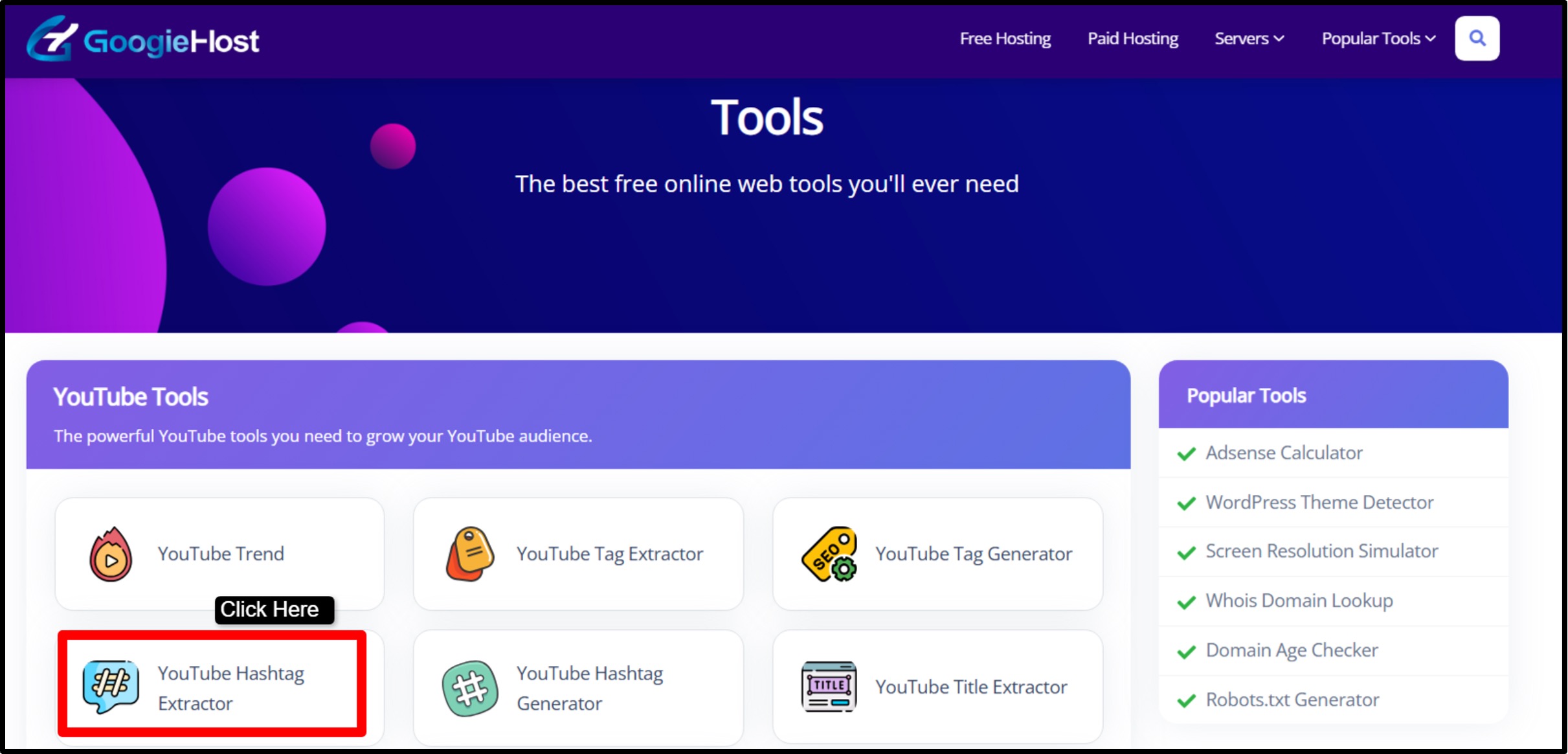
Step1) Visit the Tool Page >> Go to googiehost.com/tools >> Once there, locate the YouTube Hashtag Generator from the list of available tools. The interface is clean and straightforward, making it easy to begin immediately.
Step2) Enter the Main Keyword >> In the input field, type the primary topic of the video. This should be the main phrase viewers are likely to search for — for example, “best YouTube hashtags for gaming videos” or “easy home workout routine.” Using a clear, focused keyword helps generate more accurate and relevant hashtag suggestions.
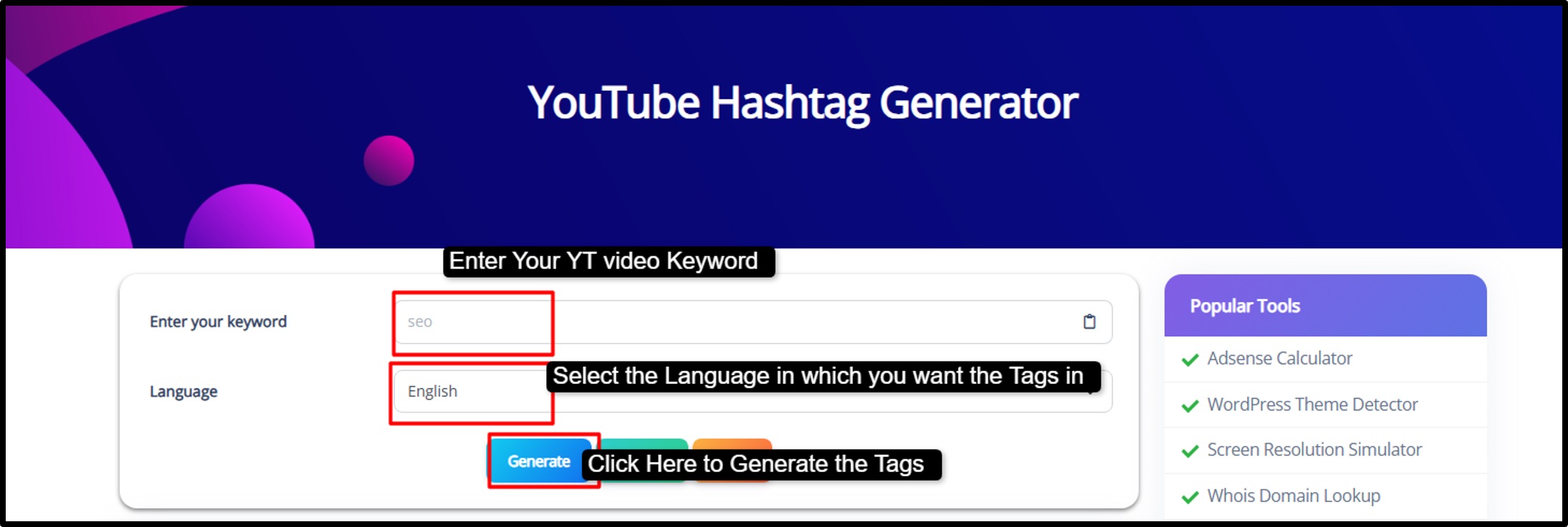
Step3) Choose the preferred language if targeting a specific audience or region >> Click the Generate button. Within seconds, the tool will produce a curated list of optimized and trending hashtags related to the entered keyword.
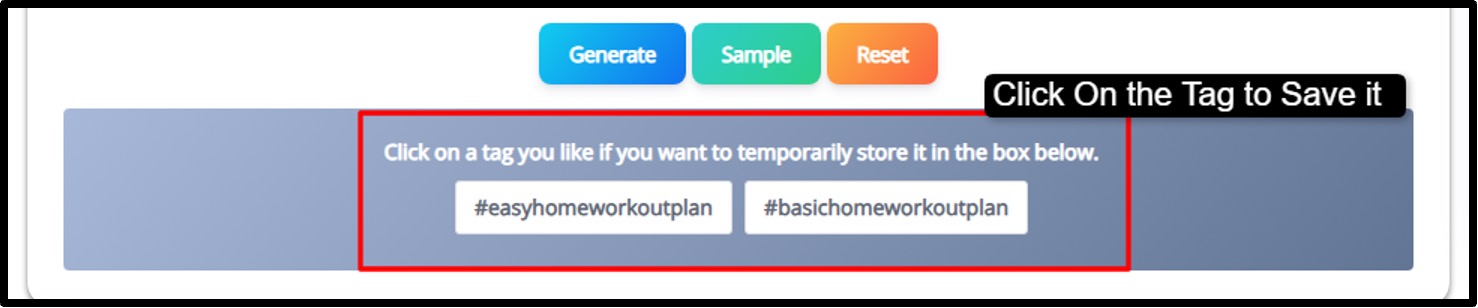
Step4) Review the list and select the most relevant hashtags. Copy them with one click and paste them into the video title or description before publishing.
This entire workflow takes only a few minutes but can save hours of manual research.
|
Please Note: Always place the primary keyword as the first hashtag to strengthen SEO signals and improve topic clarity for YouTube’s algorithm. |
Pros and Cons of Using a YouTube Hashtag Generator
Using a YouTube Hashtag Generator can simplify content optimization and improve discoverability. However, like any SEO tool, it works best when used strategically and not blindly.
+Pros
- Instantly generates relevant hashtags without manual research.
- Helps videos align better with YouTube’s search algorithm.
- Increases chances of appearing in search and suggested feeds.
- Identifies popular and currently relevant hashtags.
- Easy to use with no technical skills required.
- No mandatory sign-up or subscription needed.
- Generates hashtags tailored to specific content categories.
-Cons
- Broad keywords may produce less specific hashtags.
- Hashtags alone cannot guarantee viral success.
Best Practices for YouTube Hashtags to Maximize Your Reach
Hashtags can boost your views if used smartly. Drawing from years of SEO experience, here are few leading tips to get the most out of GoogieTools' generator:
- Keep It Relevant and Specific: Stick to hashtags that directly match your video's content. Avoid misleading ones to prevent algorithm penalties.
- Limit to 3-5 Per Video: YouTube allows up to 15, but quality beats quantity. Over-tagging can hide your video from searches.
- Mix Branded and Trending Tags: Create your own like #GoogieToolsTips, then blend with popular ones from the generator.
- Place Them Strategically: Put the top 3 in your description's first lines! They'll appear above your video title for easy clicks.
- Use Location-Based Hashtags: For local content, add geo-specific tags like #NewYorkFoodie to target regional audiences.
- Monitor Performance: After uploading, use YouTube Analytics to track views from hashtags and refine your approach.
- Avoid Spaces and Special Characters: Hashtags should be one word or camel case, like #YouTubeSEO, for proper functionality.
Incorporating these practices can turn a good video into a viral hit, boosting engagement and subscribers.
The Role of Hashtags in YouTube SEO: Why They Matter More Than You Think
When talking about YouTube SEO, most creators immediately focus on titles, thumbnails and descriptions. See! Those elements are critical but hashtags quietly play a powerful supporting role in how content is categorized and indexed. They act as clear signals to YouTube’s algorithm, helping it understand the theme and intent behind a video.
The more accurately a video is categorized, the higher the chances it has of appearing in search results. Hashtags also help bridge the gap between search intent and content discovery.
For example, long-tail hashtags such as #bestyoutubehashtagfeneratorforbeginners target very specific queries with lower competition, making it easier to rank for niche searches.
On the other hand, broader hashtags like #youtubetips reaches a wider audience but faces higher competition. A smart strategy balances both, combining niche-focused tags for precision and broader tags for visibility.
They are especially good for YouTube Shorts, where quick, scrollable content thrives on trending and searchable tags. Shorts often depend heavily on hashtags to appear in feeds. When used correctly, hashtags increase discoverability, connect videos to trending conversations and improve the likelihood of organic traffic growth.
Channels that regularly optimize their hashtag strategy often see noticeable improvements in impressions and reach over time. Pairing this approach with a reliable hashtag generator ensures the tags are data-driven and fit with current search behavior, giving content a measurable competitive edge.
Common Mistakes to Avoid When Using YouTube Hashtags
Even experienced creators can misuse hashtags, and small mistakes can limit performance. Avoiding these common pitfalls can make a significant difference in overall SEO results.
- Overloading with Hashtags: Adding too many tags can dilute relevance; keeping them focused and limited maintains stronger SEO signals.
- Using Irrelevant Trends: Jumping on viral hashtags that don’t match the content can reduce audience trust and hurt engagement.
- Skipping Branded Hashtags: Unique channel-specific tags help build identity and group related videos together.
- Ignoring Performance Data: Without reviewing analytics, it’s impossible to know which hashtags are driving traffic.
- Incorrect Formatting: Hashtags must be written without spaces (e.g., #BestYouTubeHashtags) to function properly.
Avoiding these errors ensures a more strategic approach that supports long-term channel growth.
Real-World Examples: How Creators Are Winning with Hashtag Generators
Practical application shows just how powerful optimized hashtags can be.
Case1
Consider a fitness creator struggling with low impressions despite high-quality workout tutorials.
After implementing targeted hashtags such as #HomeWorkoutRoutine, #BeginnerFitnessTips, and niche-specific variations generated through a smart tool, the channel experienced a significant increase in search visibility.
Within weeks, organic views began climbing steadily as the videos appeared in more relevant feeds.
Case2
A similar transformation occurred with a cooking channel that strategically combined branded hashtags like #ChefAtHome with high-performing tags such as #EasyRecipes and seasonal food trends.
This balanced approach improved discoverability while strengthening brand identity. As a result, several videos began appearing in recommended sections, driving higher engagement and subscriber growth.
Result
These examples highlight a clear pattern: targeted, relevant and well-researched hashtags can turn overlooked content into high-performing assets.
When supported by a reliable hashtag generator and combined with quality content, creators position themselves for regular & scalable growth rather than depending on luck or unpredictable viral moments.
Frequently Asked Questions About YouTube Hashtag Generators
Q1. How many hashtags should I use?
Ans. YouTube recommends using 3 to 5 relevant hashtags for best results. Using too many can dilute your message and reduce engagement.
Q2. Can hashtags go in titles?
Ans. Yes! You can place hashtags in your video title, but they are most commonly added in the description for better organization and aesthetics.
Q3. Do they work for all niches?
Ans. Absolutely! Hashtags are effective for every niche, from music and gaming to education and tech.
Q4. Are they free?
Ans. Yes! Using hashtags on YouTube costs nothing, and the Hashtag Generator on GoogieHost.com is also 100% free.
Q5. How do they boost SEO?
Ans. Hashtags make your videos more discoverable by connecting them to trending topics and relevant keyword searches, improving ranking and reach.
Why Choose GoogieTools Over Other Hashtag Tools?
There are plenty of hashtag generators out there. Some are basic and some are cluttered with ads. That’s where GoogieTools feels different. Instead of using generic tags into a list, it focuses on generating hashtags that are actually relevant, searchable and aligned with YouTube SEO best practices.
One of the biggest advantages is that it’s completely free and easy to access. There is no complicated setup and there’s even no forced sign-ups before getting results. Just enter a keyword and get optimized suggestions instantly.
Another strong point is how smoothly it connects with other YouTube optimization tools. You even get to use tag extractors and description generators. Everything works together as part of a complete Youtube SEO workflow.
GoogieTools is a practical, beginner-friendly and strategy-focused solution for creators who want better discoverability and steady channel growthwithout overcomplicating the process.

Aman Singh
CREATIVE HEAD
Enjoy the little things in life. For one day, you may look back and realize they were the big things. Many of life's failures are people who did not realize how close they were to success when they gave up.