Open Graph Generator
Create Open Graph meta tags for Facebook, LinkedIn and X, then copy the ready-made code to your site.
Have you ever shared a website link on social media platforms like Facebook, Twitter, or WhatsApp and noticed that some links look professional with eye-catching images and descriptions, while others appear plain and unattractive? You know this is the power of Open Graph tags.
The GoogieHost tool, Open Graph Generator, helps you to create these tags in seconds, ensuring your website pages look polished and engaging whenever they are shared online. It does not matter if you are a blogger, a marketer, or even a business owner; this free tool will make it easy for everyone to control how their content appears on social media.
If you have the right Open Graph tags, you can easily boost your click-through rates and even improve your brand visibility. This will help you make a stronger first impression without even writing complex code.
You simply generate, copy, and add your tags to your website to make every shared link look professional and unique.
What is the Open Graph Protocol?
The Open Graph Protocol (OGP) is a set of metadata tags that helps social media platforms understand and display your web pages correctly when they are shared. This was developed by Meta.
Open Graph tags under this protocol allow website owners to control important elements such as the page title and description with their featured image. It also looks after the URL preview.
For example, if someone shares a blog post on any social media platform, open graph tags will determine what users see in the link preview, and without these tags, social platforms may even display incorrect or incomplete information.
If you use this protocol, you can create attractive and consistent link previews that can improve user engagement and increase your click-through rates. In simple terms, it acts as a communication bridge between your website and social media platforms, so your content always looks professional when shared.
Why You Need an Open Graph Generator Tool
There are certain good reasons why you need this specific tool and how it can help you.
- Creates Attractive Link Previews: This tool helps you create eye-catching and attractive titles with descriptions. It even helps to add images to make it look better.
- Saves Time: Instead of manually creating Open Graph tags, this tool does the job for you. It generates the required code instantly and reduces your setup time.
- Eliminates the Need for Coding Skills: Here, you don’t need to understand HTML or metadata. You just have to enter the required details, and the tool will create the tags for you.
- Consistent Social Media Appearance: Using this tool, your content will always display correctly across platforms like Facebook, LinkedIn, and many more. It maintains your professional look.
- Allows easy customization: This tool gives you the free will where you can choose your exact title and description. You can even choose an image of your choice or one that looks aligned when your link is shared.
- Improves Brand Visibility: If you keep sharing professional links across different platforms, this consistency in your link previews will help you to strengthen brand recognition and make your content more memorable.
Key Features of GoogieTools Open Graph Generator
Now, let us understand how this tool is backed by its amazing features and uncover them:
- Easy Input Fields: You just fill in a few boxes (like the title, description, and image link), and the tool will instantly do the rest. You don’t need to have any coding knowledge for it.
- Real-time Preview: Before you copy any code, you can actually see how your link will look when shared on Facebook or Twitter. You get what you see here.
- Customizable Options: You can even add extra details, like the details of the page. You can add that the page is an article or any video, or that it is set up for different languages/countries.
- Free and Unlimited Use: There are no paywalls here and no monthly limits. You can easily generate as many tags as you want. So, this is great if you have lots of content.
- SEO-Friendly Defaults: The tool nudges you to keep descriptions short, like under 200 characters, so they look clean on social media instead of cutting off.
- Copy-Paste Ready Code: Once it is done, it gives you finished HTML code that you can directly paste into your website, and no editing is required here.
- Mobile Responsiveness Design: The tool works smoothly on phones and tablets, not just computers.
- Error Checking: The tool warns you if something looks wrong. For example, if your image is too small, Facebook wants images to be at least 1200x630 pixels, and the tool flags that automatically.
How to Use the Open Graph Generator Step by Step
Let us now understand how you can use this tool freely and gain benefits from it:
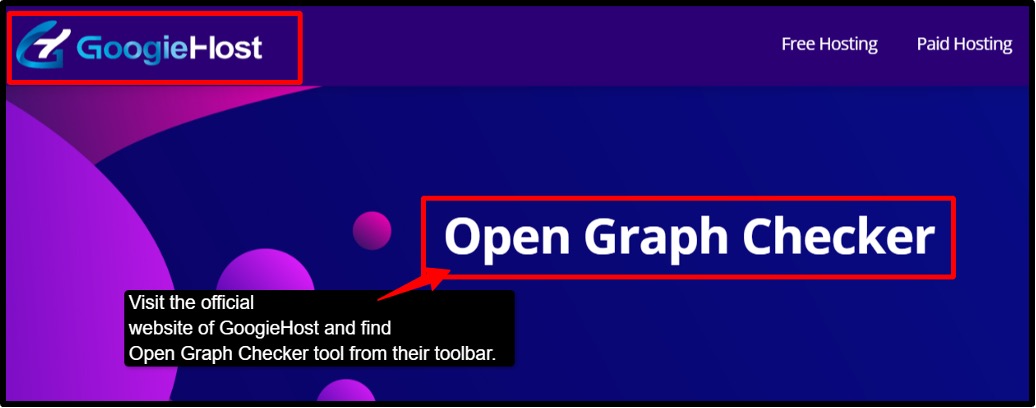
- Step 1: Visit the official page of GoogieHost >> Navigate to the tool section, and you will find Open Graph Generator.
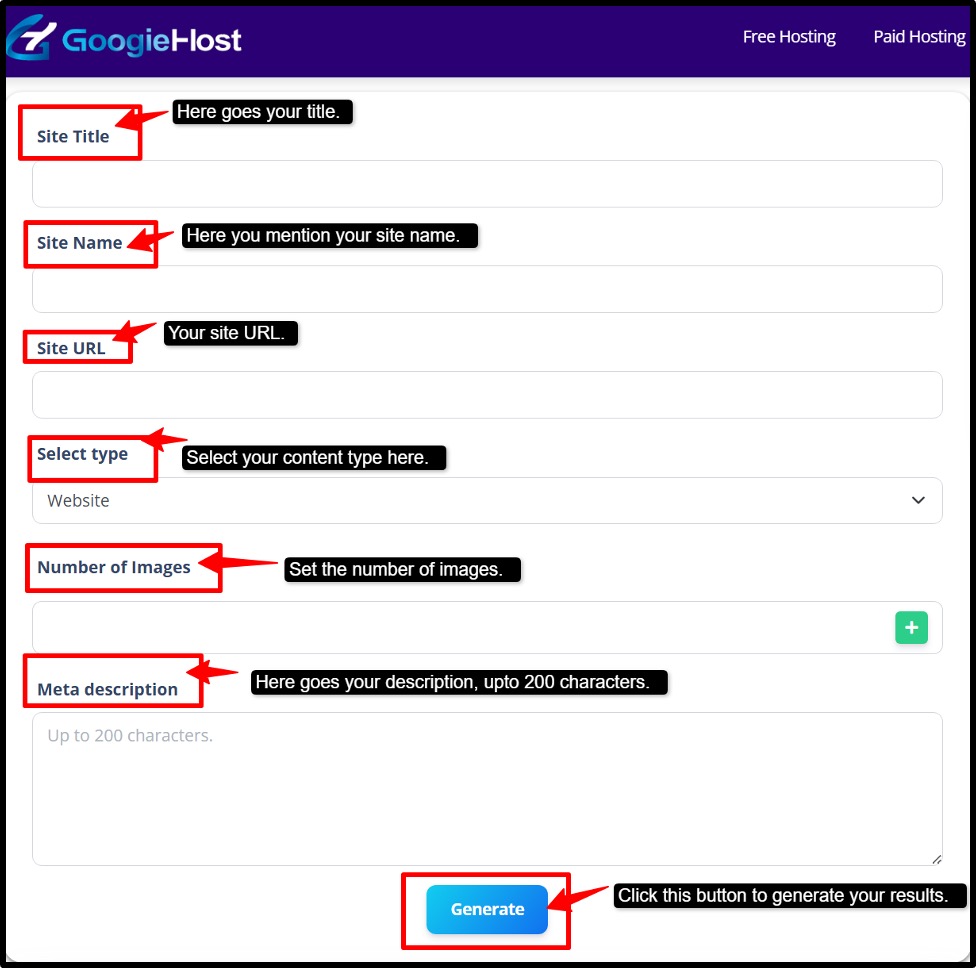
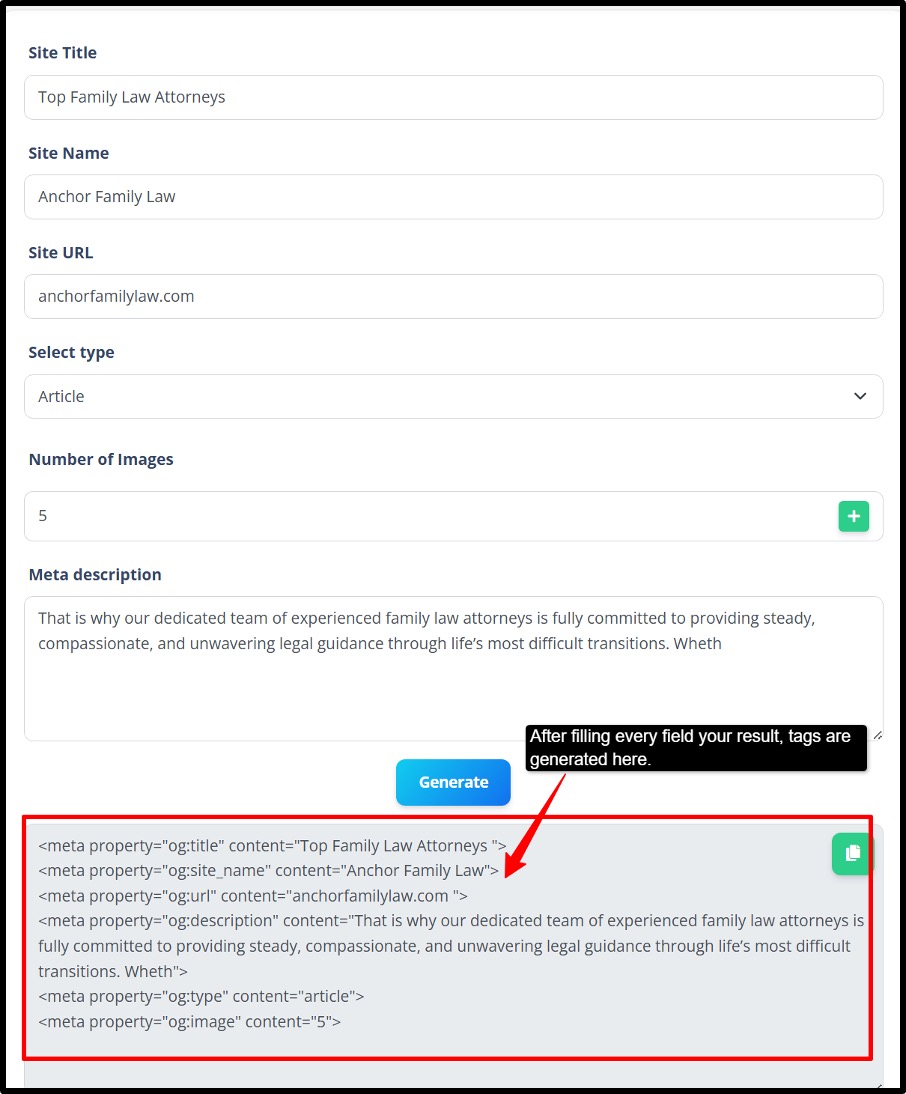
- Step 2: Now fill in the basic fields >>Title (your page/article name) >> Description (a summary; keep it under 200 characters) >> Image URL (a link to your image; make sure it is at least 1200x630 pixels), and Page URL (the link to your webpage).
- Step 3: Set your content type, like choosing what kind of page it is, like it's an article, a video, or a website.
- Step 4: Set your language (optional). If your content targets a specific country or language, set it accordingly.
- Step 5: Preview your tags >> Check the real-time preview to see how your link will appear on Facebook or Twitter before generating.
- Step 6: Fix any errors before moving forward, like wrong image size or anything.
- Step 7: Generate the code >> Click the “Generate” button to get your finished HTML meta tag code.
- Step 8: Copy and paste into your website, and you are done.
- Step 9: Test your preview (recommended). Share it on various social media platforms and see how it looks.
Once your code is live on your site, every time someone shares your link on any social media platform, it will show a clean preview with the chosen image, title, and description.
So, it's all done in under a minute, and now your website looks better and more professional.
Pros and Cons of Using an Open Graph Generator
Here are some pros and cons of this tool:
Pros:
- Time-saving
- Beginner-friendly.
- Cost-effective.
- Improve Social Engagement.
- SEO-Boost.
Cons:
- Limited advanced-level customization.
- Dependency in input fields.
- No automatic implementation.
- Platform-specific behaviour.
Advanced Tips for Optimizing Your OG Tags
Use these advanced techniques for optimizing your Open Graph tags so you can take the benefit from the tool:
- Use power words in your OG. Title: You should keep it under 60 characters and use attention-grabbing words like "ultimate," "free," or "proven" to boost your click rates on social media.
- Write a Scroll-Stopping Description: Don't just describe everything; you need to sell your click. Tell the readers what they will gain by clicking, and keep it between 150 and 200 characters.
- Always use a custom OG image: Never leave it to chance. A custom image always gets 3x more engagement than a random auto-picked one. The best size is 1200x630 pixels.
- Use different tags for different platforms: Use different tags for different social media platforms, like what goes on Facebook should be different from what goes on Twitter.
- Test Before You Publish: Use some free debugger tools to test your publish.
- Add og:locale for Global Audience: If your content targets multiple countries, set the correct language code to reach the right audience.
Common Mistakes to Avoid with Open Graph Tags
There are some common points that you need to watch out for before you use this tool:
- If you forget to add the title or the image tag, then social media will just show a boring and blank preview. So always fill in the must-have fields first.
- If your image file is too large, your page will load slowly, and people will leave even before it opens, so always compress your image before using it.
- Most people scroll social media on their phones; if your image looks weird or gets cut off on a small screen, you are going to lose your clicks. Always preview on mobile too.
- If you use identical titles and descriptions on all your pages, it confuses Google and social platforms. Every page needs its own unique tags, just like each page has its own topic.
- Last but not least, just because you added the tags, it doesn’t mean they will work correctly. You always need to check using a free tool like the Open Graph Checker or Facebook Debugger to make sure everything looks correct.
FAQs About Open Graph Generator
Q1. Why should I use Open Graph tags?
Ans. If you do not use these tags, social media will randomly pick any text or image from your page; often, it's the wrong one. OG tags give you full control, so your link always looks professional and eye-catching. It should be clickable whenever it is shared because more clicks means more traffic.
Q2. Is the tool free to use?
Ans. Yes, it is 100% free. There is no requirement for any sign-up or any kind of subscription. You will not see any hidden charges, and you can generate unlimited tags anytime without any restrictions.
Q3. What image size works best for Open Graph?
Ans. Always use 1200x630 pixels. This is the universal safe size that looks sharp on Facebook, Twitter and LinkedIn without getting it cropped or stretched.
Q4. How do I add the generated code to my site?
Ans. Just simply copy the code and paste it inside the <head> section of your webpage. On WordPress, you can use the RankMath or Yoast SEO plugin, which needs no coding at all.
Q5. Does the Open Graph Generator work for all platforms?
Ans. Yes, the tags work across all major platforms like Facebook, Twitter/X, LinkedIn, WhatsApp, and Telegram. One set of tags covers all of them.
Why Choose GoogieTools' Open Graph Generator Over Competitors
We’ve all been there: You share a blog post, and it looks terrible on social media. It has no image, as the wrong title has just a boring link. That is exactly what used to happen before tools like this existed. Now you don’t have to learn from those mistakes the hard way.
If your goal is to rank higher on Google or simply make your content look better when it is shared on social media, this tool will get the job done for you, and that too for free. It is easy to use and is designed according to the latest SEO rules.
So stop letting your links look dull and unprofessional. Set up your OG tags once, and every share will automatically look clean, attractive, and clickable.