
Meta Tags Analyzer




Have you ever thought what Google actually sees when it visits your site? Or maybe you built a webpage, and it's not showing on Google. The problem might be hiding in your meta tags, basically the small, invisible labels in your webpage’s code that tell search engines what your page is about.
If your title tag is too long, your meta description is missing, or your keywords don’t match your content. Google gets confused and pushes your page down in search results. Most website owners don’t even know these issues exist, and that is exactly what GoogieHost’s tool, Meta tags analyzer is.
Meta tags analyzer is a free GoogieHost tool which is easy to use and checks all your meta tags in seconds. You don’t need any technical skills for this. Simply paste your webpage URL, hit the Analyze button and instantly get a full report covering your title tag, meta description, and keywords.
GoogieHost's Meta Tags Analyzer is a free and easy-to-use tool that checks your website's meta tags like titles, descriptions, and social sharing info. It helps your site show up better in search results and gets you more clicks.
What is GoogieHost's Meta Tag Analyzer?
GoogieHost's Meta Tag Analyzer is a free tool that scans any website link and checks all the important meta tags on your page. It looks at things like your page title, description, and social media preview tags to make sure everything is set up correctly. If something is missing or not done right, it tells you exactly what the problem is and how to fix it.
Getting these tags right makes a big difference in how your website appears on Google and social media. A good title and description can attract more clicks, while missing or poorly written tags can hurt your rankings. This tool makes it easy to spot and fix those issues without needing any technical knowledge.
How do I Use the Meta Tags Analyzer?
Now lets see step by step and understand the steps so that you can easily use the tool.
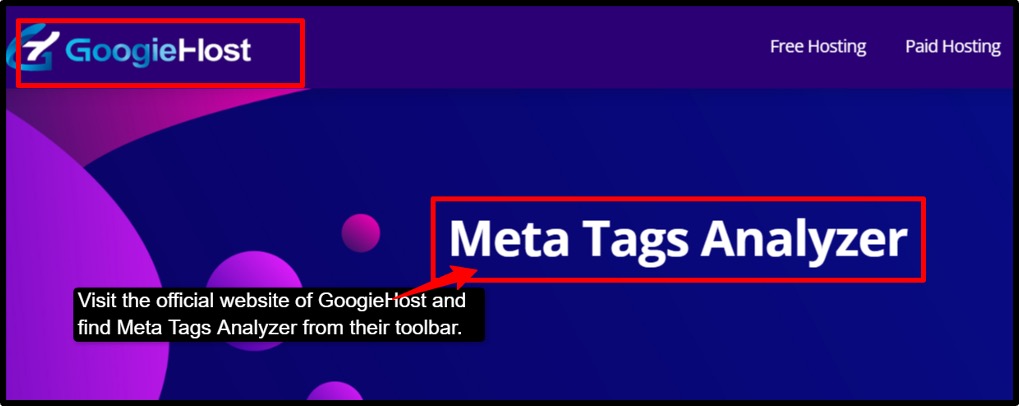
- Step 1: Visit the official website of GoogieHost >> Navigate to their toolbar section and find Meta Tags Analyzer.
- Step 2: Enter your website URL. You see an input box where you can paste the URL of the webpage you want to analyze into the input field.
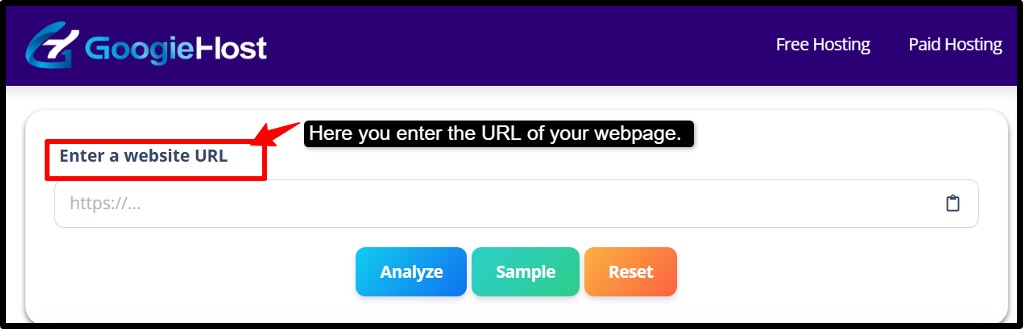
- Step 3: Hit the analyze button. Once you enter the URL, click the “Analyze” button, and within seconds, the tool will show you the results without any hindrance.
- Step 4: Review your Meta title, which shows the character count of your title but also performs an SEO check to show how important and relevant your content is.
- Step 5: Check your Meta Description; you need to avoid exceeding the character limit, typically around 150 characters.
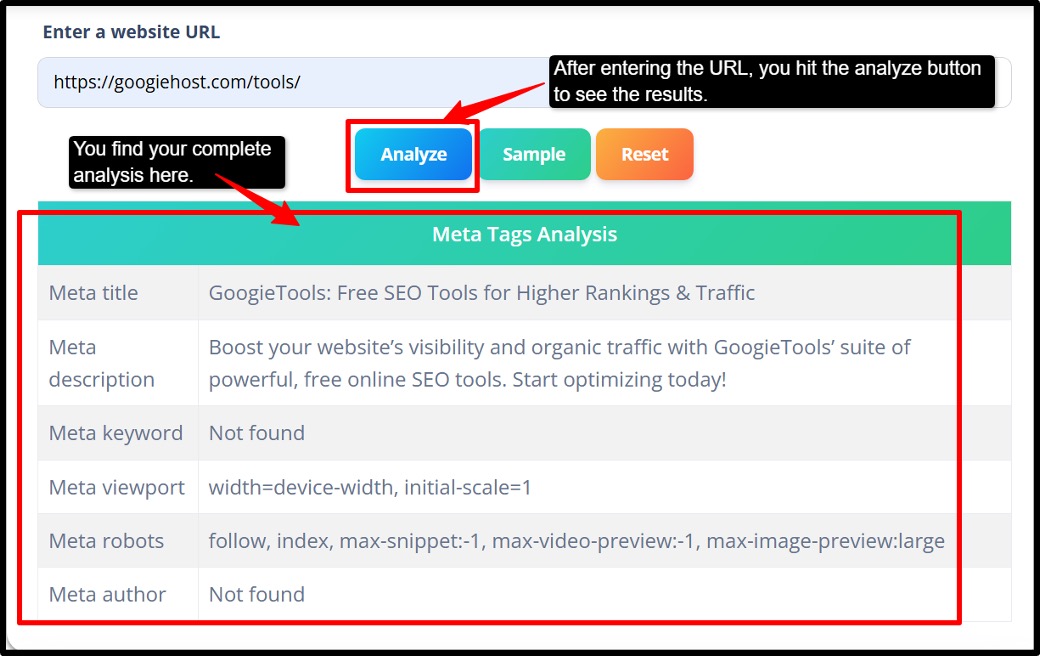
- Step 6: Analyze your Meta keywords; it is very simplified using this tool. You can easily understand the keyword character length and relevance.
- Step 7: Check for Heading tags and other elements. The tool breaks down the keywords on the page from images, heading tags, and URLs.
- Step 8: Fix the issues that you found. Once you receive the report, you can note anything flagged and edit it.
- Step 9: After editing, come back to the tool and run the analyzer again with the same URL to confirm that everything is now properly set and your page is search engine-ready
What the report typically includes
- The tool checks your page title to see how it looks in search results and whether it follows best practices.
- It reviews your meta description to make sure it is the right length and matches what your page is actually about.
- It looks at your robot's settings to check if your page is set to be found and indexed correctly, along with any other meta tags on the page.
- It verifies your Open Graph and Twitter tags to make sure your page previews look great when someone shares it on social media.
Who Benefits from the Meta Tags Analyzer
Now lets understand who all gain good benefits from using this tool.
- SEO Specialists’
If you work in an SEO related field and manage multiple websites, this tool will help you quickly to check that your page titles and descriptions are correct. Before you publish a page or after you make any changes. It saves you a lot of time by catching mistakes early.
- Content Marketers
If you write content for websites and want more people to click on your links in Google search results, this tool shows you the title and description, and you can check that it even matches what the users are actually looking for or not. So if more people click on your page instead of your competitor’s page.
- Webmasters & Developers
When you are launching a new website or moving it to a new server, a lot of things can break, including meta tags, robot settings, and social preview tags. This tool then helps you quickly audit all of that in one place, so nothing slips through the cracks.
- Digital Agencies
If you manage SEO for multiple clients, you can use this tool to check how your client’s pages look in Google search results compared to their competitors page and then you can use that information to build a smarter SEO strategy.
Benefits of Using GoogieHost's Meta Tags Analyzer
Let's see the core benefits of using this tool:
- Instant Visual Check for Title & Description: It checks your text in pixels, meaning it shows you exactly how your title and description will look on the Google search result page. This matters really because if your text is within the character limit, it can still get cut off if it's too wide on screen. This tool catches that problem before Google does, so you never lose important words.
- Actionable Suggestions to Improve CTR: CTR means Click Through Rate, which means how many people actually click on your link. This tool doesn’t just point out problems and leave you guessing. It gives you clear and practical suggestions on how to make your title and description more relevant and easy to find for users.
-
- Full Coverage of SEO & Social Tags: This tool checks not just one or two tags; it covers all the important ones in one go.
- Title tags: the clickable heading that appears on Google.
- Meta Descriptions: the summary shown below your title in search results.
- Robots Tags: tells Google to index your page or not.
- Open Graph (OG) Tags: controls how your page looks when shared on Facebook and LinkedIn.
- Twitter Cards: controls how your page appears when shared on Twitter/X
- Faster QA for Multiple Pages: QA means Quality Assurance, checking every page is working correctly. If you manage a website with many pages, like a blog, an online store or a business, you need to make sure every single page has its own unique title and description. This tool quickly checks each page one by one to make sure every page has unique and on-brand meta tags.
Why Choose GoogieHost's Meta Tags Analyzer?
- It is built around the current SERP (Search Engine Results Page). Google does not cut off your title or description based on the number of characters; it cuts them off based on pixel width (how wide the text looks on screen). This tool gives you practical recommendations that actually work on both desktop and mobile screens.
- The tool is designed to get more people to click on your page. It encourages you to write titles that are short, clear and match what the user is searching for. It suggests staying between 50-60 characters, which fits within Google’s 600px title display width and for descriptions, it guides to stay within -920px so nothing gets cut off. Your search listing looks clean now.
- GoogieHost’s analyzer is rewrite-aware, meaning it checks your title tag that matches your page’s H1 heading( the main heading). When these two align and are consistent, Google is far less likely to rewrite them. This keeps your messaging consistent and ensures users always see the title and description you wrote.
- It is user-friendly with a simple workflow where you just enter your URL, and within seconds, you get a clear and easy-to-read report that tells you exactly what is wrong and what to fix first. The fixes are prioritized, meaning the most important issues are shown at the top so you know where to focus your energy. There is no confusion or guesswork.
How to Optimize Your Website’s Meta Tags
1. Title Tags: Your page title is the first thing people see on Google, so make it count and better.
- Keep it between 50-60 characters so it doesn't get cut off on any device.
- Put your most important keyword at the beginning of the title.
- Make sure your title matches your page’s main heading (H1), this stops Google from replacing your title with its own version.
- Don’t repeat the same word multiple times (keyword stuffing) and avoid adding your brand name unless it truly helps the readers.
2. Meta Descriptions: This is the summary that appears below your title in Google results. It doesn’t directly affect your ranking, but it hugely affects the number of people clicking on your link.
- Keep it between 120-158 characters, fits perfectly for both mobile and desktop users.
- Write it like you are talking to a real person, tell them clearly what the page is about.
- Make sure every page has its own unique description.
- Even if Google occasionally rewrites it, a well-written description still guides what Google shows.
3. Robots & Other Tags: These are the behind-the-scenes tags that control how each engine and social platform interacts with your page.
- Always double-check your index/follow settings.
- Add Open Graph and Twitter Card tags so your page looks great with a proper image, title, and description.
- Don't waste time on meta keywords; Google completely ignores them for rankings, so they serve no SEO purpose.
You can easily run your page through the Meta Tags Analyzer, fix the issues it highlights, and then re-run it after making changes to confirm everything looks good.
FAQs
Q1. How does this Meta Tag Analyzer work?
Ans. This tool is very simple to use: you just paste your URL or HTML, and it will instantly scan your page’s title, descriptions, Open Graph, and other meta tags. It also flags issues and scores them against SEO best practices.
Q2. Can I use this tool for multiple pages or domains?
Ans. Yes, it can be used for unlimited pages and domains, and that too completely free. Simply analyze one URL, review the results, and then come back and paste a different URL to check another page.
Q3. Does this tool store or share my data?
Ans. No, your URLs and meta tags are analyzed in real time and never stored or shared with any of the third parties. Each session is completely private, and once your content is analyzed, the data is removed.
Q4. What should I do if my meta tags are too long or too short?
Ans. Too Long: You can then cut it short (title: 50-60 characters, descriptions: 150-160 characters), or Google will cut them off in search results.
Too Short: You can then expand it with relevant keywords and a clear value proposition to improve click-through rates. You can even use the character counter tool.
Q5. Can this tool help improve website ranking?
Ans. Not directly, but it helps in eliminating meta tag errors that can silently hurt your SEO. It can help in fixing missing titles, duplicate descriptions, and wrong OG tags that send clear signals to search engines, which supports better indexing and ranking over time.
.

Aman Singh
CREATIVE HEAD
Enjoy the little things in life. For one day, you may look back and realize they were the big things. Many of life's failures are people who did not realize how close they were to success when they gave up.