
Text to Hashtags



Turning plain text into powerful, engagement-ready hashtags doesn’t have to be a struggle, because this is where we introduce you to one of the best platforms serving users the best kinds of tools: it is GoogieHost, and the tool is Text to Hashtags.
It has been designed for speed and simplicity, as it instantly converts your ideas, captions, or keywords into relevant, trendy hashtags that will boost visibility across social media. In case you are a content creator, a marketer, or any casual user, this tool will help you to make your content stand out with the right tags at the right time.
With a simple UI with Convert, Sample, and Reset functions, GoogieHost's Text To Hashtags is a free browser-based tool that transforms any input text or caption into a collection of pertinent, structured hashtags ready to be copied into social media posts.
Who benefits from the Text To Hashtags
Let's see how this tool has been offering benefits to users:
- Social media managers and content creators have been using this tool, Text to Hashtags of GoogieHost, and making their daily workflow much easier by instantly generating relevant and trending hashtags based on their content. Instead of spending a lot of time researching what tags to use, they can quickly get optimized suggestions that improve reach and engagement. This will allow them to focus more on planning content, storytelling, and maintaining consistency across multiple platforms.
- Small businesses and marketers are using this tool, like their simple growth assistant tool, which is helping them with their posts to reach the right audience without needing expert knowledge of hashtag strategies. It is especially useful for those with limited budgets, as it improves visibility organically. By using accurate and targeted hashtags, businesses can promote their products or services more effectively and connect with potential customers who are already interested in similar content.
- There are even individuals who are posting on different platforms like Instagram, X, TikTok, and YouTube Shorts. The tool simplifies content sharing by turning simple captions into discoverable posts. Even without technical knowledge, users can increase their chances of getting more likes, views, and followers. It helps everyday users make their content more visible and engaging with minimal effort.
How do I Use the Text To Hashtags?
To use this tool effortlessly, follow these steps and the images that have been attached.
Step 1. First, open your browser and go to the GoogieHost website, where their free tools section is available.
Step 2. Navigate to the “Text to Hashtags” tool from the list of tools provided on the platform.
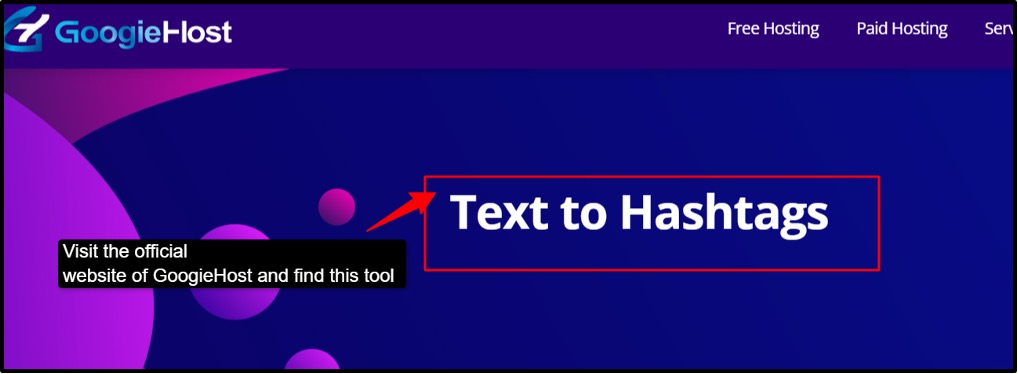
Step 3. Once the tool page opens, you will see an input box where you can enter your text or caption.
Step 4. Type or paste your content into the box; this could be a post caption, keywords, or a short description.
Step 5. Keep your text clear and relevant to your topic so the generated hashtags are more accurate.
Step 6. After entering the text, click on the “Generate” or similar button provided on the tool.
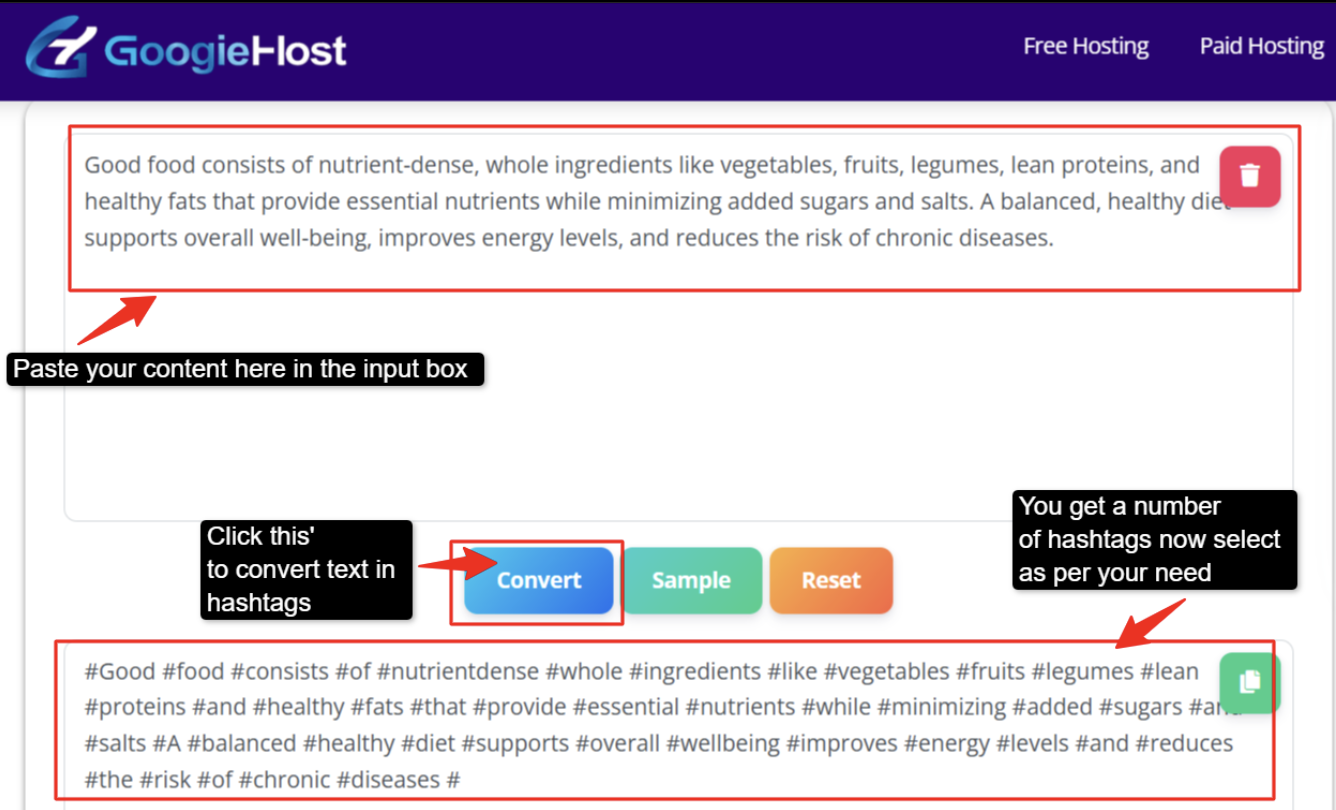
Step 7. The tool will instantly process your input and convert it into a list of relevant hashtags.
Step 8. Review the generated hashtags and select the ones that best match your content or platform.
Step 9. Copy the hashtags directly from the tool with a single click or by manually selecting them.
Step 10. Paste these hashtags into your posts on platforms like Instagram and TikTok to improve visibility and engagement.
Optional: You can click the “Sample” button to auto-fill example text and see how the tool works, and you can also click the “Reset” button to clear the field and start again fresh.
Benefits of using GoogieHost’s Text To Hashtags
Let's find out some of the major benefits of this tool:
- Instant Hashtag Generation: In just a few seconds, this tool transforms unstructured text into well-organized hashtags. Users can just paste their caption or idea, and the program intelligently breaks it down into meaningful, organized hashtags, saving them the trouble of painstakingly thinking of tags one by one. In addition to saving time, this guarantees that the hashtags are clear, readable, and consistent with the content, improving post discoverability and professionalism.
- Helpful Sample Option for Beginners: The sample option for brief demos is another helpful feature that lets people understand how the tool works without having to submit their own material. This is especially helpful for novices since it provides a ready-made example that increases confidence and improves usability, enabling efficient use in a matter of seconds.
- Accessible for Global Users: People from a variety of places and linguistic backgrounds can use the tool successfully because it is user-friendly and globally accessible. Because of this inclusion, users, advertisers, and content producers around the world can profit without facing linguistic or usability challenges.
- All-in-One Convenience: By offering numerous features in one location, GoogieHost's suite of free tools increases customer value by enabling quick and easy access to a variety of capabilities, including hashtag generation, within a user-friendly environment for digital tasks.
Why choose GoogieHost’s Text To Hashtags?
Along with its benefits, it is important to understand why this tool is worthy:
- Simple and Easy to Use
One of the main reasons is its simplicity. The tool is built with a clear, single purpose: to turn your text into hashtags quickly and efficiently. There are no complicated steps or confusing settings. You just paste your text, click generate, and get instant results. This straightforward approach makes it perfect for anyone who wants quick output without wasting time figuring things out.
- Completely Free with Added Value
Another great advantage is that this tool is completely free and part of a wider set of SEO tools. So, you are not just using one feature; you are actually getting access to a whole ecosystem designed to support content creation and improve online visibility. It is very useful for bloggers, marketers, and creators, as it adds convenience in their work, and they can use multiple tools in one place without switching platforms or paying extra.
- Multilingual and Globally Accessible
Lastly, its multilingual availability makes it accessible to many users worldwide. Users from different regions can interact with the tool in their choice of language, making it easier to understand and use. This makes sure that, regardless of any language background, they can benefit from generating effective hashtags and improving their content reach.
FAQs
Q1. How does the Text to Hashtags tool work?
Ans. To be able to figure out the keywords and phrases in your plain text, such as a caption, a sentence, or keywords, the GoogieHost Text to Hashtags tool understands it. After that, it eliminates unnecessary words like "and" and "the" and converts the relevant keywords into hashtags by correctly formatting them and adding the "#" symbol. You receive a clean, usable list of hashtags in a matter of seconds because the entire procedure takes place instantly in the background.
Q2. Why should I use hashtags for my posts?
Ans. It's important to use hashtags in your articles since they help users who are following or looking for particular topics find your material more easily. Hashtags function as labels that classify your content on sites like YouTube, Instagram, and TikTok, enabling it to reach a wider audience than simply your followers. They connect your posts with audiences that are actually interested in that issue, boost visibility, and enhance engagement.
Q3. Can I use these hashtags on all social media platforms?
Ans. Actually, a number of platforms, such as Instagram, X/Twitter, TikTok, YouTube, LinkedIn, Pinterest, and others, employ hashtags. Selecting relevant tags that adhere to each network's guidelines improves searchability and visibility.
Q4. Does this tool generate trending hashtags?
Ans. By examining the text you submit and figuring out its key terms, this program creates appropriate hashtags. It removes common, meaningless words like "is," "the," and "and" and focuses on the key words that best represent your subject or point. After that, it transforms those important concepts into properly formatted hashtags by appending the "-" symbol and occasionally changing word combinations or spaces to improve readability.
Q5. How many hashtags should I use in a single post?
Ans. The right amount of hashtags differs based on the platform, but in general, fewer relevant hashtags are more successful. While 3–6 hashtags work well on TikTok, 5–15 hashtags work well on Instagram. One or two hashtags are sufficient for X, and three or five hashtags are perfect for YouTube Shorts. Picking important and targeted hashtags should always take preference over using too many, since this increases reach and maintains the clean, interesting appearance of your material.

Aman Singh
CREATIVE HEAD
Enjoy the little things in life. For one day, you may look back and realize they were the big things. Many of life's failures are people who did not realize how close they were to success when they gave up.