
Meta Tag Generator





You must have spent hours building your website. But if your meta tags are missing or wrong, Google doesn’t even know what your page is about, and neither do your visitors.
Think of meta tags like name tags at a networking event. Without one, nobody knows who you are or what you do. But with the right one, the right people will find you instantly.
That is exactly what GoogieHost’s Meta Tag Generator tool does. No coding and no technical headaches. You just need to fill in your page title, description, and keywords, and it generates clean, SEO ready meta tags in seconds that you can copy and paste straight into your website.
Meta tags are small pieces of code hidden in a webpage's HTML. They control how your page looks in search results, including the title and the short description shown below it.
When these are written well, more people are likely to click on your page. If your title is too long, search engines will cut it off mid-sentence, which looks messy. A clear, relevant description helps the right people decide your page is worth visiting.
What is GoogieHost’s Meta Tag Generator?
GoogieHost's Meta Tag Generator is a free tool that anyone can use with no technical knowledge needed.GoogieHost's Meta Tag Generator is a free tool that anyone can use. No technical knowledge needed. Just enter your details, and it instantly creates a ready-to-use meta title, description, and keyword tags for your webpage.
It helps you keep your title and description the right length so they do not get cut off on Google, both on phones and desktops. The tool is built around one simple goal: helping you write clear, relevant snippets that match what people are actually searching for, so they are more likely to click on your page.
How do I Use the Meta Tag Generator?
Now, let's follow these simple steps on how you can use this tool on GoogieHost:
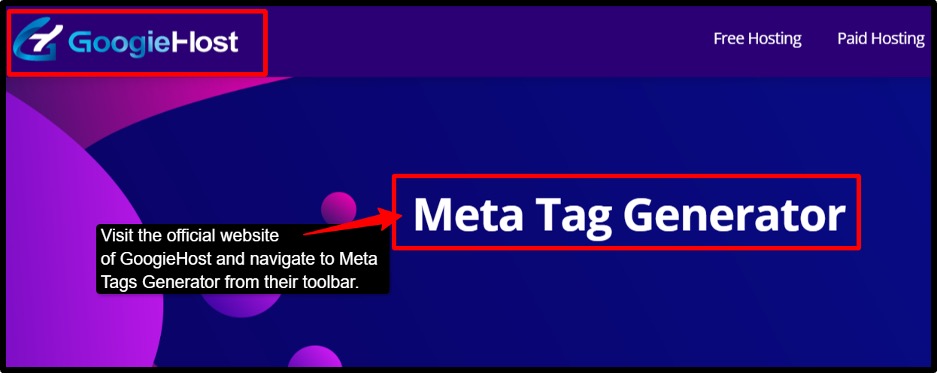
- Step 1: Visit the official website of GoogieHost >> Navigate to the Meta Tags Generator tool from their toolbar section.
- Step 2: Enter your page title >> Keep it clear and under 60 characters for best SEO results.
- Step 3: Write your description. Add a short description of your page in simple words. Tell visitors exactly what your page is about.
- Step 4: Add your keywords, separated by commas. Using 10 meta keywords is enough.
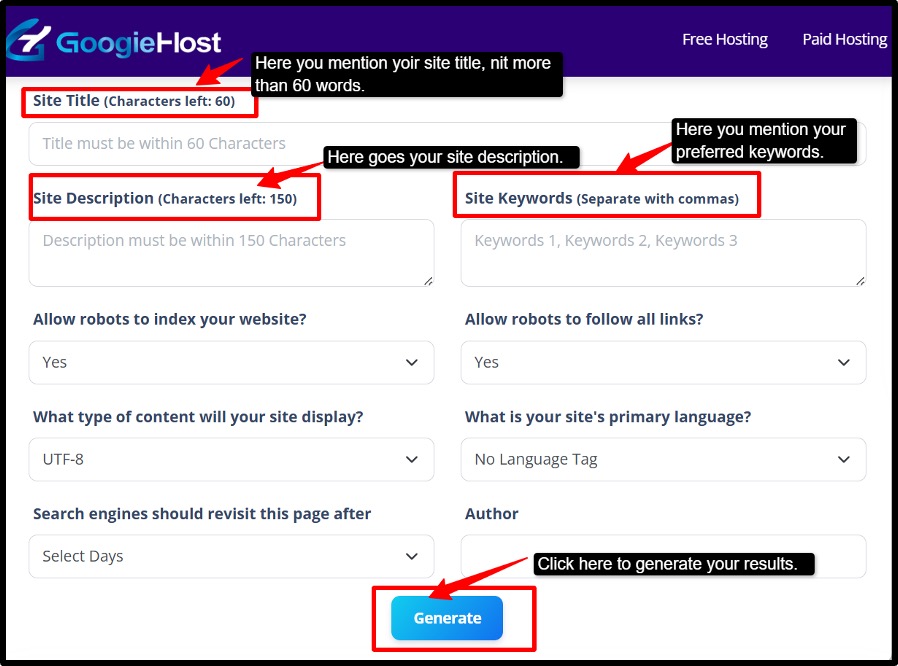
- Step 5: Choose the type of content your page has and select your website’s primary language.
- Step 6: Set the robot instructions. Choose how you want search engines to crawl and index your page. index/Follow is the recommended setting for most websites.
- Allow robots to index your website?
- Yes for public pages and No for private/test pages.
- Allow robots to follow all links, then,
- Yes to pass link equity normally, and no only for the page you don’t want bots to follow.
- Step 7: Choose your language, here you need to pick your website’s primary language for better targeting.
- Step 8: Click the Generate button, and you're ready to use the HTML meta tag code, which appears instantly.
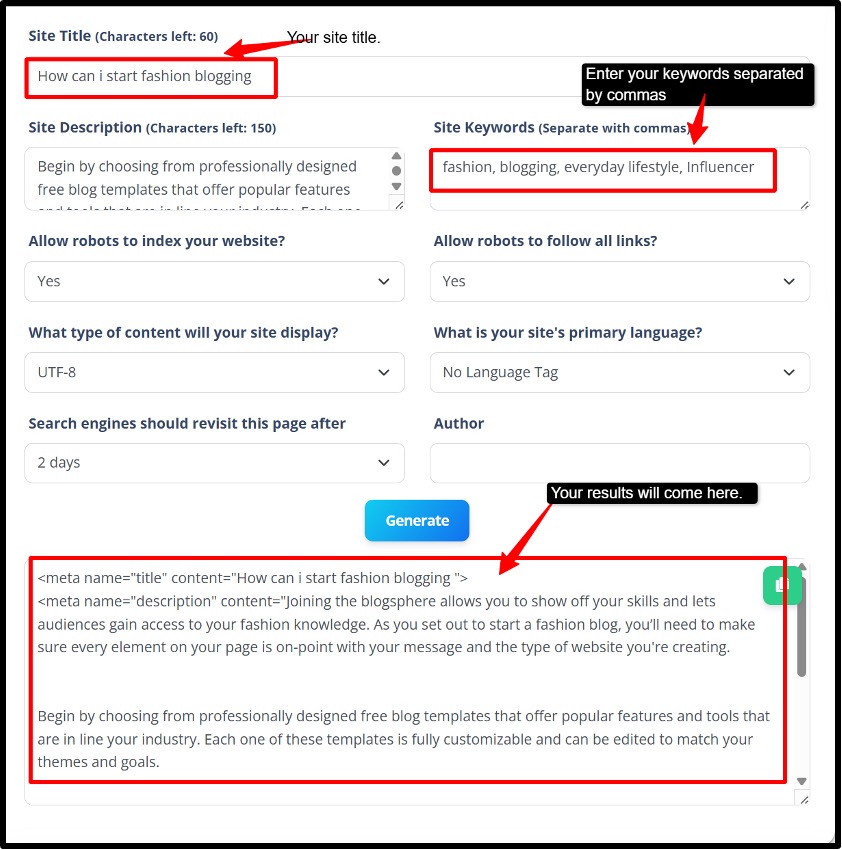
- Step 9: Copy the generated code and paste it directly into the <head> section of your webpage.
- Step 10: Verify. Here you save and publish, see the source to confirm the tags are present once.
- Step 11: Test the URL with your Meta Tags analyzer tool, or use the SERP snippet preview to verify the description or title.
Who benefits from the Meta Tag Generator
Now let's discover who all benefit from using this tool:
- Bloggers & Content Creators
You write great content, but if your title and description look boring in Google search results, nobody will click. This tool helps you write clean, catchy snippets that make people want to click your link without manually counting every character.
- Webmasters & SEOs
Managing 50+ pages means writing meta tags for every single one. This is very exhausting and time-consuming. Meta tags generator speeds up the process and keeps every page’s metadata consistent and properly sized within the limits of Google pixel, so nothing gets cut off.
- Small Businesses and Startups
You don’t have time for deep technical SEO, so this tool gives you quick, easy wins that make your pages look more professional in each result and directly improve how many people click through to your site.
- Agencies
When you are handling multiple client websites, one wrong meta tag gets cut off or rewritten by Google. This tool becomes your saviour for your team to do the quality checks faster and avoid those embarrassing problems across desktop and mobile.
Benefits of Using GoogieHost’s Meta Tag Generator
Now, let's uncover some major benefits you can get from using this tool:
- SERP-Smart Lengths: Google doesn’t cut your title based on character count, it cuts based on pixel width. So a title with wide letters like “W” and “M” gets cut shorter than one with narrow letters. This tool measures by pixel width, not characters, so your title and descriptions always display fully on both desktop and mobile.
- Higher CTR Potential: CTR means Click Through Rate, how many people actually click your link in Google results. Your meta description does not directly boost your ranking, but it acts like a mini advertisement. More clicks means more traffic, even without moving up in rank.
- Fewer Rewrites: Google sometimes ignores your meta title completely and replaces it with text it pulls from your page. This usually happens when your title is too long, too vague, or it is stuffed with keywords. This tool helps you write tight, focused titles that Google respects and keeps as written, as your page shows up exactly the way you intended.
- Workflow Speed: If you manage a website with dozens of pages, writing meta tags one by one is a time killer. This tool lets you generate clean, properly formatted meta tags in seconds for every page, keeping everything consistent, on-brand, and up to current SEO practices without slowing your whole team down.
Why Choose GoogieHost’s Meta Tag Generator?
There are several reasons why you should proceed with this tool, such as:
- Google’s search results page keeps changing, so what worked for you 3 years ago will not work today either. GoogieHost’s tool is built around current Google guidelines, specifically using pixel-based limits instead of outdated character counts. This means your title and description fit perfectly in today’s search results.
- This tool encourages you to write naturally and clearly, the same way Google prefers to display snippets. When your meta tags sound human and helpful. Google is far more likely to show them exactly as you wrote them instead of rewriting them.
- GoogieHost’s Meta tags generator needs zero technical knowledge. You fill in your details, hit generate, preview how it looks, and copy it straight into your wesbite, it's done in minutes. If you are a solo blogger or a full marketing agency handling 100 pages, the output is always clean, consistent, and professional every single time.
FAQs
Q1. What is the recommended length for meta titles and descriptions?
Ans. Always keep your meta title between 50-60 characters and your meta description between 150-160 characters. Go beyond these limits, and Google will cut your text off mid-sentence in search results, making your listing look incomplete and costing you clicks. GoogieHost’s Meta tag Generator automatically tracks these limits for you, so you always stay within the safe zone without counting a single character manually.
Q2. Can I use this tool for multiple pages?
Ans. Yes, absolutely, GoogieHost’s Meta Tag Generator works for as many pages as you need; there are no limits, no sign-up, and it's completely free. Just fill in your details for each page separately, generate the tags, copy and paste them into that page’s HTML, and repeat. Each page gets its unique, SEO-ready meta tags in seconds.
Q3. Does the Meta Tag Generator create keywords meta tags too?
Ans. Yes, it does, along with your title and description. This tool also creates keyword meta tags for your page. You just need to enter your keywords separated by commas, and the tool includes them in your generated HTML code instantly.
Q4. Will using a Meta Tag Generator guarantee higher rankings?
Ans. No tool can guarantee higher rankings. It just helps you show up correctly in search results with clean, well-written titles and descriptions that improve your click-through rate. More clicks signal to Google that your page is relevant, which can impact your Google rankings. Good meta tags only work best when it is combined with quality content, backlinks, and complete SEO.

Aman Singh
CREATIVE HEAD
Enjoy the little things in life. For one day, you may look back and realize they were the big things. Many of life's failures are people who did not realize how close they were to success when they gave up.