
Google Index Checker





Is your website even visible on Google, or is it just sitting online without being found? That is a question every website owner should ask, and the GoogieHost Google Index Checker helps you answer it in seconds.
Getting indexed by Google is the foundation of online visibility, and without it, your content may never reach your audience. This is a simple yet powerful tool that lets you instantly check if your website or any of the pages are appearing in Google search results or not. There is no guessing, no complex SEO tools; you get just clear and direct results.
If you are a blogger trying to grow traffic, a business owner aiming for customers, or a student who is learning SEO, then this tool will give you a quick reality check of your site’s search presence. If your pages are indexed, you are rightly on track, but if not, it is a signal to improve your SEO strategy.
The GoogieHost Google Index Checker keeps things fast, simple, and reliable, so you always know where your website stands on Google.
What Is a Google Index Checker?
An online application called a Google Index Checker is used to determine whether Google has indexed the pages on your website.
The process by which search engines like Google, Yahoo, and Bing crawl and preserve your webpages in their databases so they can show up in search results is known as indexing. Search engines and your audience can't see your pages if they aren't indexed.
This process is made easier with GoogieTools' Google Index Checker, which lets you enter URLs and view their indexing status right away. It gives you insight into what's functioning and what needs to be fixed, much like an access pass to Google's database.
This tool is your first step to making sure your website is discoverable, regardless of your level of experience with SEO.
Why You Need a Google Index Checker to Strengthen Your SEO Game
Consider your website like a book in the vast library that is the internet. No matter how excellent the content is, it won't be found if it isn't cataloged. You may verify that your "book" is on the shelf and prepared for discovery by using a Google index checker. This is the reason it cannot be negotiated:
- Diagnose Indexing Issues: When you publish a page on your website, Google needs to crawl and index it before it can show up in search results. Sometimes pages get missed or blocked due to crawl errors, noindex tags, and technical glitches. A Google index checker helps you spot exactly which pages have these problems so you can fix them before they hurt your traffic.
- Boost SEO Performance: If your page is not indexed, it simply does not exist for Google, meaning no matter how good your content is, nobody will find it through search. By confirming all your important pages are indexed, you ensure that search engines can read and rank your content; your chances of appearing on Page 1 of results go up significantly.
- Save Time: Manually checking for each page that is indexed means going to Google and typing "site:yourwebsite.com/page" one by one, which becomes extremely difficult for large sites. A Google Index Checker automates this entire process in seconds, showing you the status of all your pages in one go, saving hours of work.
- Stay Ahead of Competitors: Many website owners never bother to check if their pages are indexed. By regularly monitoring this, you will gain a silent plus point or advantage that your content will be fully visible to Google, while competitors' pages might be invisible due to overlooked indexing issues. More indexed pages means more chances to rank higher than them.
Key Features of GoogieTools’ Google Index Checker
Google Index Checker from GoogieTools is a powerful tool with a ton of tools to make your tasks easier, not simply another SEO tool. What you receive is as follows:
- Bulk URL Checking
This feature allows users to check multiple URLs simultaneously rather than testing them one by one. You can paste a list of pages or upload them in bulk, and the tool quickly shows which pages are indexed and which are not. It saves a lot of time for website owners, bloggers, and SEO professionals who manage large sites.
- Instant Results
The tool gives real-time indexing status immediately after you submit URLs. There is no waiting, no kind of delays, only a quick confirmation if Google has indexed your pages or not. This feature helps you take fast action if a page is missing from search results.
- User-friendly Interface
GoogieHost tools are designed to be simple and easy to use, even for beginners. It has a clean layout with minimal steps; you just need to paste URLs and click on the check button. For this, you don’t require any technical skills.
- Detailed Reports
After you go through the checking process, the tool then provides in-depth reports showing a number of things, like
- Which URLs are indexed?
- Which are not indexed.
- Possible issues (if any)
- Status breakdown for better understanding.
This feature helps users in diagnosing SEO or crawling problems easily.
- Exportable Data
You can download or export results in formats like CSV. This is very useful for SEO audits and client reporting. It helps you keep records for future analysis, and you can also easily share them with your team members or stakeholders.
- Mobile-friendly Design
Google Index Checker has this amazing feature where you get a smooth user experience on your mobile phones, tablets, or desktops. You can check indexing status anytime, anywhere; there is no need for you to carry any heavy setup or your computer everywhere.
- Integration with Other Googie Tools
It allows the index checker to work with other GoogieHost tools and SEO utilities. You can easily combine it with keyword tools, site audit tools, or backlink tools. It helps in creating a complete SEO workflow in one place, making the analysis more powerful and connected.
How to Use GoogieTools’ Google Index Checker: A Step-by-Step Guide
It's as simple to use the Google Index Checker as making coffee in the morning. Here's how to begin:
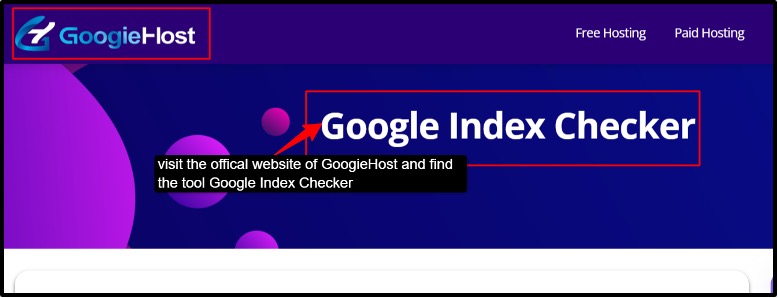
Step 1: Go to the official website of GoogieHost and find the Google Index Checker from their tools search bar.
Step 2: Now, once you find the tool, paste the URLs you want to check into the input box. Here you can add one URL or multiple URLs (bulk checking). Make sure each of the URLs is on a new line for accurate results.
Step 3: Start the checking process. Click on the “Check Index” or similar button. Then this tool will start scanning your URLs as it connects with Google data to verify if your page is indexed or not.
Step 4: View the results now. Once the scan is complete, you will see the results immediately. It will show you the indexed and non-indexed pages.
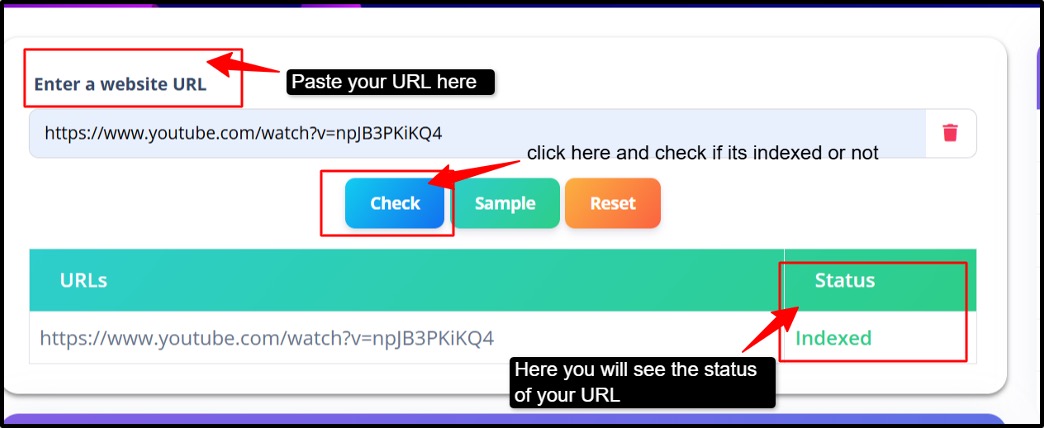
Step 5: Now you need to analyze the report. Take a closer look at the results to understand your website’s performance.
Step 6: Finally, download the report (if the export option is available) or note the results. Use the data to fix the non-indexed pages and submit URLs to Google Search Console.
Pros and Cons of GoogieTools’ Google Index Checker
The Google Index Checker has pros and cons just like any other tool. Here’s a balanced look:
Pros
- Saves time and effort of manual work.
- Available to freelancers and small enterprises.
- Easily manages both big e-commerce websites and tiny blogs.
- Simplifies your SEO improvements.
- Individuals who are unfamiliar with SEO can easily use it.
Cons
- Limited Advanced Features
- 100 URLs are the maximum for bulk checks in the free version.
- No Auto-Scheduling
Now let's see how the tool proves to be a benefit for its users.
Benefits of Regularly Checking Your Google Index Status
Now let's see how the tool proves to be a benefit for its users:
Why develop a habit of doing this? The advantages are enormous, from improving rankings to troubleshooting. I suggest it to all of my clients for the following reasons:
- Improved SEO Performance
When you are checking daily, only your pages are getting indexed, and then only you get a clear picture of how your website is performing on Google. "Indexed pages" simply means more visibility in search results, and "non-indexed pages" means you have missed SEO opportunities. If you identify and fix these indexing issues, then you can be assured that your important pages actually appear in search engines.
- Traffic Boost
No indexing means there will be no traffic. It is very simple to understand. When your pages are properly indexed, they become discoverable. So then, if more pages are indexed, there will be more chances to rank, and you will experience better visibility. Using the index checker tool helps you to make sure your content is not invisible.
- Error Prevention
The tool helps you to catch problems easily and early before they turn into bigger SEO issues. It detects the pages that are not indexed and helps to identify technical issues like broken links and crawl errors. By regularly checking these, you prevent the long-term damage to your site’s search presence and maintain a healthy website structure.
- Competitor Analysis
You can also use the tool to check your competitors and their pages. Understand how many of their pages are visible on Google, and then you can compare indexing patterns. Spot the essential gaps where you can outperform them. This will allow you to have a smarter edge in planning your SEO strategy and finding opportunities they might have missed.
- Content Strategy Refinement
The index checker helps you understand what type of content Google prefers to index. It helps in identifying the pages that get indexed quickly, you can spot the content that gets ignored, and improve low-performing pages. Based on this, you can refine your content strategy by creating more valuable and SEO- friendly content, updating the old pages, and improving internal linking.
Integration of long tail keywords: If you're thinking about the "benefits of employing a Google index checker tool for SEO," it's all about growth and visibility.
Common Reasons Why Pages Aren't Indexed by Google
Talking as an expert, here are some of the common and top reasons why your pages are not getting indexed:
- Noindex Tags: A noindex tag tells Google not to include a page in search results. If this tag is added (even by mistake), Google will skip that page completely.
- Robots.txt Blocks: The robots.txt file controls which pages search engines can crawl. If a page is blocked here, Google won’t even access it, so it won’t get indexed. Sometimes this happens accidentally, especially on new or updated websites.
- Low-quality Content: Google avoids indexing pages that have thin, duplicate, or low-value content. If your content doesn’t provide useful information, it may be ignored.
- Crawl Budget Limits: Google gives each website a limited crawl budget (number of pages it checks). If your site has too many low-value or duplicate pages, important pages might be skipped.
- New Site Syndrome: New websites often take time before Google fully trusts and indexes them. This delay is normal and happens because Google is still discovering your site.
How to Fix Common Indexing Issues
Don't panic if the Google Index Checker shows pages that aren't indexed. The following are typical problems and solutions:
- Noindex Tags: Check your page’s HTML, or SEO plugin settings, and remove the noindex tag from important pages. After fixing, request indexing in Google Search Console so Google can crawl it again.
- Crawl Errors: Go to the Google Search Console and look for crawl errors like 404 or server issues. Fix the broken links, correct the wrong URLs, or set proper redirects so Google can access your pages easily.
- Low-Quality Content: Improve your content by making it useful, original, and detailed. Add proper heading, keywords, and valuable information so Google sees it as worth indexing.
- Sitemap Issues: Create a clean and updated XML sitemap and submit it to Google Search Console. Remove broken or unnecessary URLs so Google can find and index the right pages faster.
- Slow Site Speed: Always enhance images, use caching, and choose a fast hosting provider to improve loading time. A faster website helps Google crawl more pages and improve your chances of getting indexed.
Frequently Asked Questions About Google Index Checker
Q1. Is GoogieTools' Google Index Checker really free?
Ans. Yes, the tool is completely free for basic use. There are no hidden charges or any kind of fees. You can check URLs without paying, though some advanced features or limits may apply depending on usage; the core feature works without any cost. It is a good option for beginners and small website owners.
Q2. How accurate is the tool?
Ans. The tool is quite accurate as it checks data based on Google indexing signals. It uses Google’s data, so results are generally trustworthy. However, sometimes results may slightly vary due to Google’s frequent updates or delays.
Q3. Can I check competitor sites with this tool?
Ans. Yes, you can check any public website, including your competitors' pages. This helps you see how many of their pages are indexed. You can use this input to improve your own SEO strategy.
Q4. What if my page isn’t indexed?
Ans. If your page is not indexed, check for issues like noindex tags or poor content. Fix the problems and make sure your page is accessible to Google. Then submit it again through Google Search Console for indexing.
Q5. Does it work for non-English websites?
Ans. Yes, the tool works for websites in any language, not just English. Google indexes content globally, so language is not a barrier. You can check the indexing status for any region or language site easily.
Conclusion: Take Control of Your Website’s Visibility with GoogieTools
Your content deserves attention, but if it is not indexed, it simply won’t be found. That's the reality many website owners face without even realizing it. The GoogieHost Google Index Checker brings those hidden problems into the spotlight, giving you clear insights and quick answers about your pages.
It's not just a tool; it is a smart way to stay in control of your website’s visibility. From spotting indexing issues to helping you fix them faster, it keeps your SEO efforts on the right track. No confusion, no technical overload, just simple and easy steps to use, and useful results you can act on.
Stop letting your pages sit unnoticed. Start checking, start improving, and make sure your content actually reaches people searching for it. Even if you are a beginner managing your first blog or someone handling multiple websites, this tool keeps things simple and effective.
Use the Google Index Checker now and take charge of your website’s growth.