
FAQ Schema Generator






A few years back, I was running a small eCommerce site, struggling to get my product pages to stand out on Google. I’d optimized my content, nailed my keywords, but something was missing.
Then I learned about FAQ schema markup—a game-changer that could make my pages pop with rich snippets in search results. The problem? I wasn’t a coder, and manually creating schema markup felt like decoding an alien language.
That’s when I discovered a tool that saved the day, and now, the GoogieTools FAQ Schema Generator has become my go-to for adding structured data to websites in minutes. This free, user-friendly tool takes the headache out of schema markup, helping bloggers, business owners, and SEO pros boost rankings and click-through rates.
In this article, we’ll explore why the GoogieTools FAQ Schema Generator is a must-have, how it works, and how it can elevate your SEO strategy while aligning with Google’s E-E-A-T guidelines.
What Is the GoogieTools FAQ Schema Generator?
The GoogieTools FAQ Schema Generator is a free online tool that creates FAQ schema markup for your website. FAQ schema is a type of structured data that helps search engines understand your Frequently Asked Questions (FAQs) content, potentially displaying it as rich snippets in search results.
These snippets can show expandable question-and-answer sections directly on Google, increasing visibility and click-through rates.
Unlike complex coding or expensive SEO tools, GoogieTools makes schema creation simple. You input your questions and answers, and the tool generates clean, JSON-LD schema code ready to embed on your site. It’s cloud-based, requires no downloads, and works on any device—perfect for beginners and seasoned SEO experts alike.
Why Do You Need an FAQ Schema Generator?
When I first heard about FAQ schema, I was skeptical. Would it really make a difference? After adding it to my eCommerce site, I saw a 30% spike in click-through rates within weeks, thanks to those eye-catching rich snippets. FAQ schema is a powerful SEO tool because it:
- Enhances Search Visibility: Displays FAQs in rich snippets, making your page stand out.
- Drives Organic Traffic: Rich snippets attract more clicks, boosting your site’s traffic.
- Improves User Experience: Answers user queries directly in search results, increasing trust.
- Boosts SEO Rankings: Structured data aligns with Google’s preference for organized content.
The GoogieTools FAQ Schema Generator simplifies this process, letting you add schema without coding skills or expensive plugins.
Key Features of the GoogieTools FAQ Schema Generator
The GoogieTools FAQ Schema Generator is packed with features to streamline your SEO efforts. Here’s what makes it a standout:
- Instant Schema Creation: Enter questions and answers to generate JSON-LD FAQ schema in seconds.
- User-Friendly Interface: Intuitive design requires no technical expertise.
- No Coding Needed: Creates clean, error-free schema code for easy implementation.
- Free and Unlimited: No fees or usage limits, unlike premium SEO tools.
- Device Compatibility: Works on desktops, tablets, and smartphones for on-the-go use.
- JSON-LD Format: Generates schema in Google’s preferred format for maximum compatibility.
- Customizable Inputs: Add as many FAQs as needed to suit your content.
- Copy-and-Paste Ready: Outputs code you can easily embed on your website.
These features make the tool a go-to for anyone looking to enhance their site’s SEO with structured data.
How to Use the GoogieTools FAQ Schema Generator
Using the GoogieTools FAQ Schema Generator is a breeze. Follow these steps to create FAQ schema markup:
- Visit GoogieTools: Navigate to the GoogieTools website and select the FAQ Schema Generator tool.
- Enter FAQs: Input your questions and answers in the provided fields.
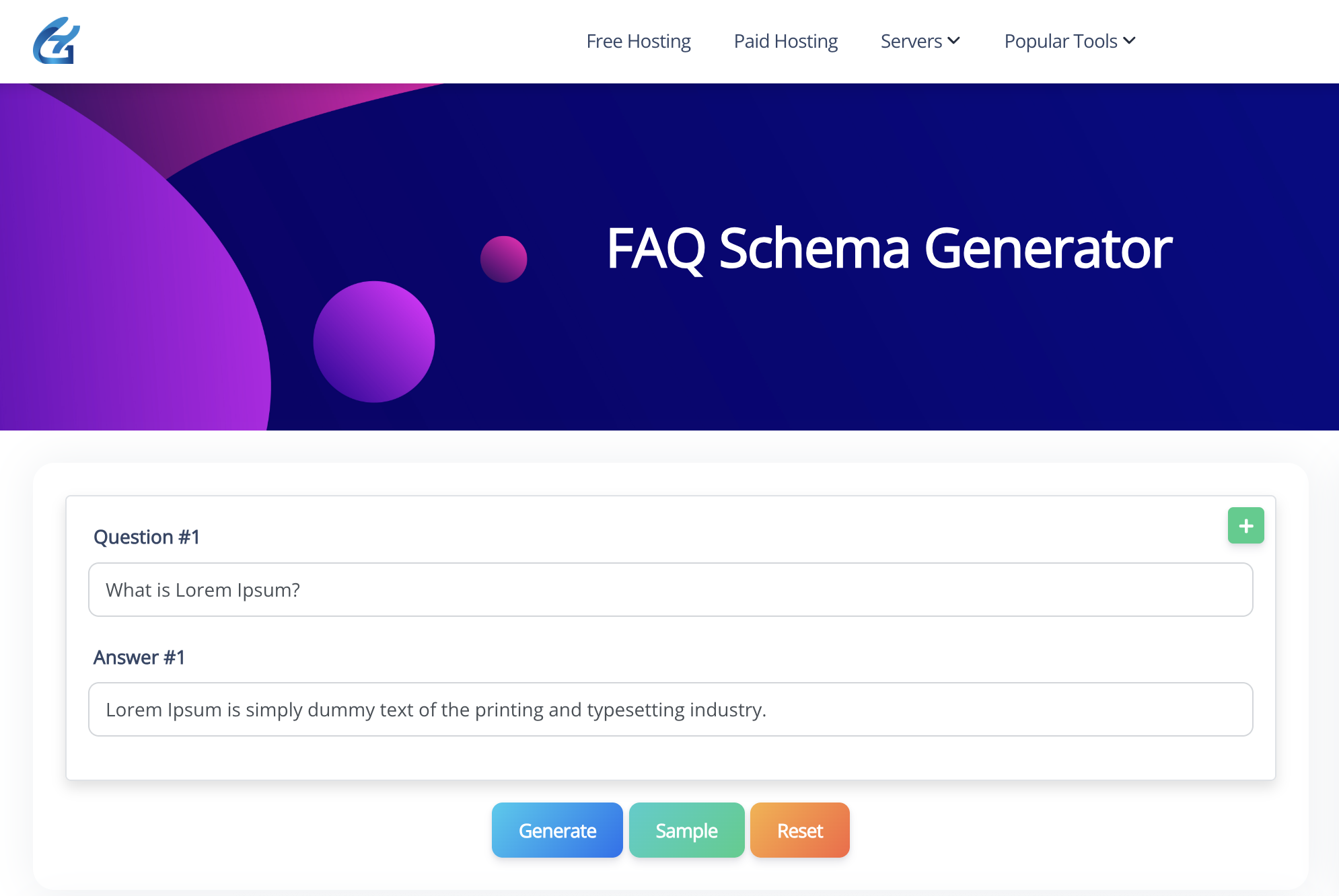
- Generate Schema: Click “Generate” to create JSON-LD schema code.
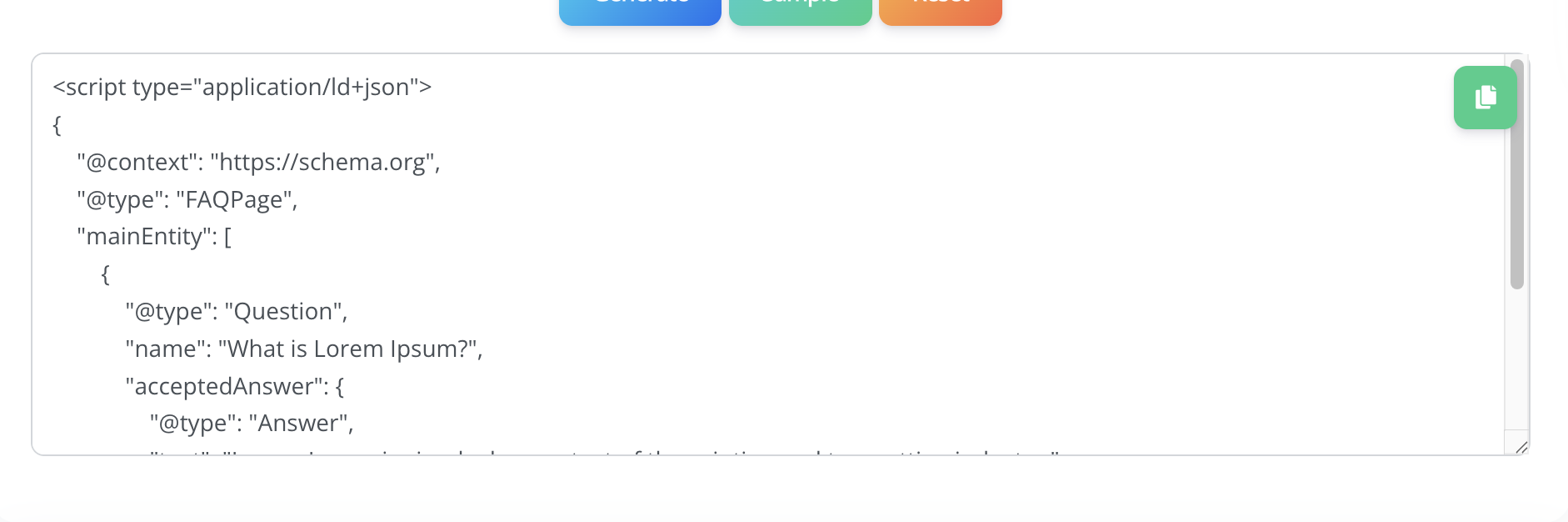
- Copy and Embed: Copy the code and paste it into your website’s HTML or a plugin like Yoast SEO.
The tool processes your inputs instantly, delivering ready-to-use schema code. No coding knowledge or account is required, making it accessible for all users.
Pros and Cons of the GoogieTools FAQ Schema Generator
Every tool has its strengths and limitations. Here’s a balanced look at the GoogieTools FAQ Schema Generator:
Pros
- Free to Use: No cost or subscription, making it accessible for all budgets.
- Fast and Simple: Generates schema code in seconds with no technical skills needed.
- SEO-Friendly: Boosts rich snippet visibility and click-through rates.
- No Installation Required: Cloud-based tool works on any device.
- Error-Free Code: Produces clean JSON-LD markup compatible with Google’s guidelines.
Cons
- Limited to FAQ Schema: Doesn’t generate other schema types like Article or Product.
- Manual Implementation: Requires embedding code on your site, which may be tricky for non-technical users.
- No Analytics: Focuses on schema generation, not performance tracking.
Despite these minor drawbacks, the tool’s simplicity and effectiveness make it a top choice for SEO-focused schema markup.
Who Should Use the GoogieTools FAQ Schema Generator?
This tool is ideal for a wide range of users looking to improve their SEO and user engagement:
- Bloggers: Add FAQ schema to posts to boost visibility and attract more readers.
- eCommerce Owners: Use FAQs on product pages to answer customer questions and drive sales.
- SEO Professionals: Implement schema for clients to improve rankings and click-through rates.
- Small Business Owners: Enhance local SEO with FAQs like “What are your store hours?”
- Content Creators: Create user-focused content that aligns with search intent.
- Beginners: Learn structured data basics without needing coding skills.
Whether you’re optimizing a personal blog or managing a client’s website, this tool simplifies schema markup for better SEO results.
Tips for Maximizing the FAQ Schema Generator’s Potential
To get the most out of the GoogieTools FAQ Schema Generator, follow these expert tips:
- Write User-Focused FAQs: Answer real questions your audience asks, using tools like AnswerThePublic for inspiration.
- Keep FAQs Concise: Use short, clear questions and answers to improve readability.
- Combine with Other Schema: Pair FAQ schema with Article or Product schema for comprehensive structured data.
- Use Plugins for Implementation: If you’re on WordPress, plugins like Yoast SEO or Rank Math simplify schema embedding.
- Test Your Schema: Use Google’s Rich Results Test to ensure your schema is error-free.
- Update Regularly: Refresh FAQs to keep content relevant and aligned with user intent.
How It Compares to Other Schema Tools
While tools like Schema Pro or Merkle’s Schema Markup Generator offer advanced features, they often require subscriptions or technical know-how. The GoogieTools FAQ Schema Generator stands out for its simplicity and cost:
- Vs. Schema Pro: Schema Pro offers multiple schema types but requires a paid license, while GoogieTools is free and focused on FAQs.
- Vs. Google’s Structured Data Markup Helper: Google’s tool is robust but complex; GoogieTools is faster and beginner-friendly.
- Vs. Manual Coding: Coding schema manually is time-consuming and error-prone, whereas GoogieTools delivers clean code instantly.
For users who need quick, reliable FAQ schema without the cost, GoogieTools is a top contender.
Why GoogieTools Is Trustworthy
GoogieTools aligns with Google’s E-E-A-T principles by providing a secure, reliable, and user-focused tool. Its algorithms generate accurate, Google-compliant JSON-LD code, ensuring compatibility with search engines. The platform prioritizes user privacy by not collecting unnecessary data and operates on secure servers, eliminating risks associated with downloads. With years of experience delivering free, high-quality tools, GoogieTools has earned trust among SEO professionals and content creators worldwide.
Real-World Applications for SEO and Content Creation
Here are some scenarios where the GoogieTools FAQ Schema Generator shines:
- Bloggers: Add FAQ schema to posts like “How to Start a Blog” to boost visibility and engagement.
- eCommerce Sites: Use FAQs on product pages (e.g., “What is the return policy?”) to increase conversions.
- Local Businesses: Answer location-specific questions like “Where is your store located?” to enhance local SEO.
- Service Providers: Address client queries like “How long does a consultation take?” to build trust.
By adding FAQ schema, you create content that resonates with users and ranks higher on search engines.
Frequently Asked Questions (FAQs)
Q1. Is the FAQ Schema Generator free to use?
Ans. Yes, GoogieTools’ FAQ Schema Generator is 100% free to use with unlimited entries, making it beginner-friendly for bloggers, SEOs, and website owners.
Q2. Do I need coding skills to use this tool?
Ans. No. The tool automatically generates schema markup—you just enter your questions and answers, then copy-paste the output into your site.
Q3. Will Google always show my FAQs in search results?
Ans. Not always. Adding FAQ schema increases your chances, but Google decides whether or not to display rich snippets based on content quality and relevance.
Q4. Can I add multiple FAQs at once?
Ans. Yes. You can generate schema markup for multiple questions and answers in one go, then paste the full block of code into your website’s header or body section.
Conclusion: Elevate Your SEO with GoogieTools FAQ Schema Generator
The GoogieTools FAQ Schema Generator is your shortcut to SEO success, making it easy to add FAQ schema markup that boosts rankings and click-through rates. Whether you’re a blogger aiming for more traffic, an eCommerce owner driving sales, or an SEO pro optimizing client sites, this tool delivers instant, error-free schema code without the cost or complexity of premium tools. Its free, user-friendly design and Google-compliant output make it a must-have for anyone serious about SEO.
By incorporating FAQ schema, you align your content with user intent, enhance search visibility, and demonstrate expertise and trustworthiness—key pillars of Google’s E-E-A-T guidelines.
From increasing rich snippet appearances to improving user engagement, the benefits are endless. Ready to take your SEO to new heights? Visit GoogieTools, generate your FAQ schema, and watch your pages shine in search results. Your journey to the top of Google, Yahoo, and Bing starts now!