
Article Rewriter


Creating fresh content consistently can feel overwhelming, especially when you are stuck rewriting the same ideas again and again. That is where the GoogieHost Article Rewriter Tool steps in to make things easier. Instead of spending hours manually rephrasing content, this tool will help you generate unique, readable versions in just a few clicks.
GoogieHost's Article Rewriter is a quick, free, and beginner-friendly tool that converts current material into fresh, readable, and SEO-ready content in seconds, without compromising its original meaning. It analyzes your input, comprehends context, and rewrites sentences with greater clarity and distinctive terminology to boost creativity and readability.
While it speeds up composition, it works best when combined with human inspection and a short plagiarism and grammatical check to provide high-quality outcomes.
What is GoogieHost's Article Rewriter?
GoogieHost's Article Rewriter is an online paraphrase tool that rewords sentences, replaces context-aware synonyms, and restructures phrases to ensure the final material flows naturally and passes authenticity checks—all while maintaining the essential idea.
It is designed to help content authors with quick rewrites, remove repeated language, and improve drafts for search without requiring manual rewriting from scratch.
How do I use the Article Rewriter? (step‑by‑step)
You just need to follow these steps to use the article rewriter and follow the image too, which has been attached for a clear guide.
Step 1: Visit the official website of GoogieHost's Article Rewriter page from your browser. Here, you will find a large input box where you can paste your content.
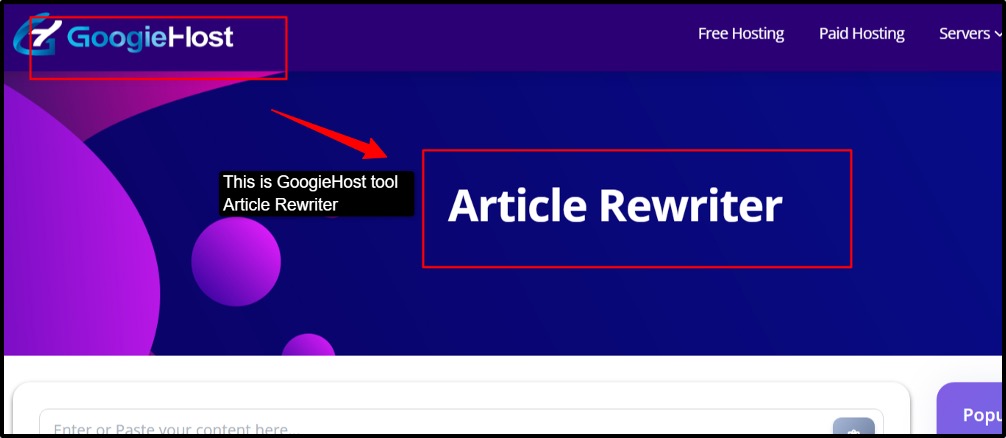
Step 2: Paste your content in the input box; copy the text that you want to rewrite and paste it there.
Step 3: This is an optional step, where you can use the clipboard import. If you see a clipboard icon on the right side of the text box, then you can use it to paste your content quickly.
Step 4: Click on "Rewrite" or the submit button to start the rewriting process. It will generate your text in a new version, but a better one.
Step 5: Once the process is done, review the output. Wait for a few seconds, and check the rewritten version generated by the tool.
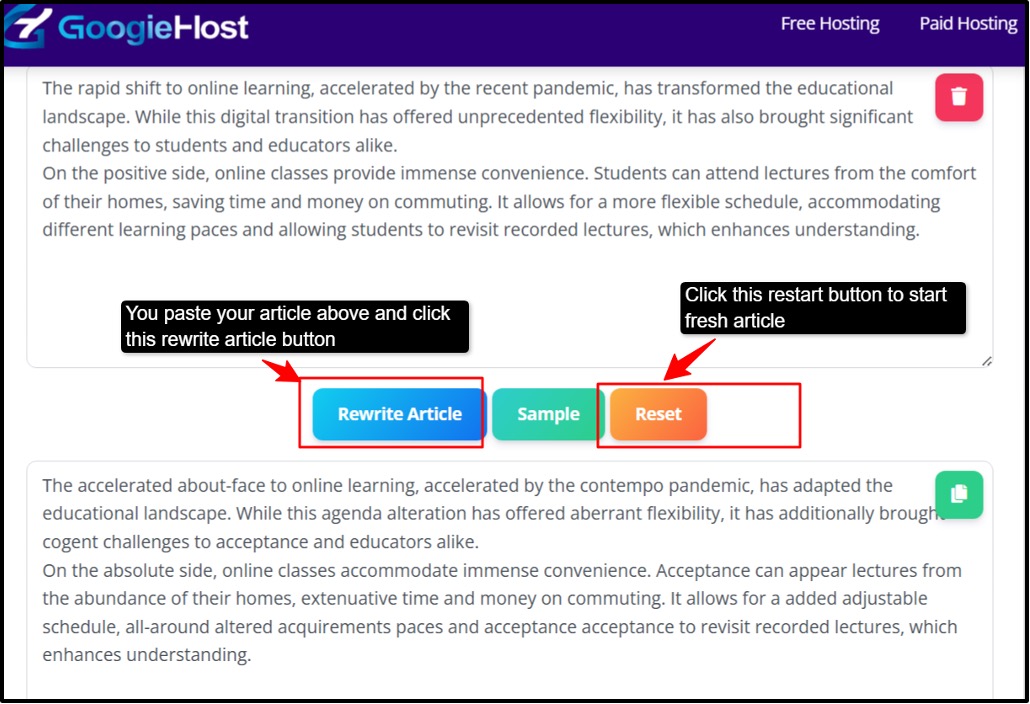
Step 6: Now select the rewritten text and use it in your document and blog editor.
Step 7: If you are someone who is still unsure of using it, then you can click on the green sample button to load the example test and see the result.
Step 8: Now, here you click the orange reset button, and the input box is cleared, and you can start fresh.
Who Benefits from the Article Rewriter
Now, who all benefit from this tool?
- Bloggers and affiliate marketers, creating fresh content regularly is essential to stay relevant and rank better. An article rewriter helps them quickly refresh old blog posts, product reviews, and category pages without starting from scratch. This means they can update content at scale while maintaining quality, improving SEO performance, and keeping their audience engaged with updated information.
- SEO experts and agencies often handle large volumes of content. This tool will help them speed up tasks like updating the outdated articles, improving pages for new keywords, and improving on-page SEO. By rewriting content, they can enhance freshness signals that are important for rankings.
- Students and researchers can use this tool to refine their drafts, making their writing clearer and more structured. It helps in rephrasing complex sentences into simpler ones while maintaining authenticity. When used properly with citations, it also ensures uniqueness and avoids accidental plagiarism.
- Social media managers often need to convert long-form content (like blogs) into short captions, posts, or snippets for different platforms. An article rewriter helps them quickly adapt the content into multiple formats, saving time while keeping the message consistent across channels like Instagram, LinkedIn, or Twitter.
- For all the non-native English writers, expressing ideas fluently can be challenging. This tool helps improve sentence structure, grammar, and overall readability. It rewrites content into more natural, easy-to-understand English, making the writing sound more professional and polished.
Benefits of Using GoogieHost's Article Rewriter
Let's see some of the benefits of Article Rewriter
- Faster content production: This tool helps you quickly turn rough or unpolished drafts into clean, readable content within seconds. It saves time, especially when you are working on tight deadlines or need to publish content consistently.
- Improved Originality: By rephrasing the restructuring sentences, the tool reduces duplication and makes your content more unique. When used carefully, it helps you avoid plagiarism issues while keeping the original meaning intact.
- SEO-ready foundations: The rewritten content often has better clarity and improved wording, which supports SEO. When combined with proper keywords and on-page optimization. It can help improve your content’s search performance.
- Ease of use: This tool has been designed to be simple and beginner-friendly. You don’t need technical skills; just paste your content, click rewrite, and get results instantly, all within your browser.
- Flexible modes and control: Many rewriter tools offer different modes or levels of rewriting. This allows you to control how much the content changes while still preserving the original meaning, giving you better flexibility and precision.
Why Choose GoogieHost's Article Rewriter?
- Designed with usability in mind: The interface is simple and easy to use, allowing for quick and distraction-free rewriting. You don’t need any technical background or prior experience to get started. Just paste your content, make your adjustments, and you are done in minutes.
- Context-aware rewriting: Enhances sentence structure and vocabulary for improved readability while emphasizing meaning retention. It doesn’t just swap words randomly; it considers the surrounding context to keep your message clear and coherent.
- Privacy-first mindset: Rewriter programs frequently stress the importance of avoiding sharing or retaining user text; combine this with your own checks and best practices. Your content stays yours, and no data is stored or reused without your knowledge.
- SEO-conscious approach: When utilized responsibly and edited carefully, it is intended to generate readable, human-sounding rewrites that adhere to quality standards. The tool helps you maintain keyword relevance without forcing awkward phrasing. A quick manual review after rewriting ensures your content performs well in search rankings.
- Free and easily accessible: Perfect for short wins, refining drafts, and updating content without incurring additional costs. There’s no subscription required, making it a go-to option for freelancers, bloggers, and small businesses. Whenever you need a quick content refresh, its ready to use without any barriers.
FAQs
Q1. Is using an Article Rewriter legal?
Ans. Yes, rewriting is usually acceptable if you have the rights to the original work or provide original expression. However, there are legal concerns when you replicate someone else's copyrighted information without their consent or make derivative works that violate copyright. Always give credit when credit is due, and strive for originality that goes beyond rewording.
Q2. Will the rewritten article be plagiarism‑free?
Ans. Rewriting helps achieve originality and avoids repetition, but no tool can ensure 100% plagiarism-free outcomes every time; for confidence, always conduct a plagiarism check and make human adjustments.
Q3. Can I rewrite articles in bulk?
Ans. Bulk rewrites should still be evaluated, revised, and optimized for intent and E-E-A-T signals for SEO and user experience. While many rewriting methods enable high-volume usage, quality can decline without editorial monitoring.
Q4. Can I use the rewritten content for SEO?
Ans. Yes—when the information is original, helpful, and of good quality. Stay away from low-quality "spun" language because search engines can identify and penalize fraudulent, duplicate, or weak rewrites. For optimal results, combine rewrites with internal linking, on-page SEO, and relevant knowledge.
Q5. Will my original text be stored or shared?
Ans. Before processing sensitive data, always read the tool's privacy note and adhere to internal compliance procedures. Best-in-class solutions prioritize privacy for users and do not keep or share text.
Q6. Is manual editing required after rewriting
Ans. Strongly advised, proofreading, plagiarism checks, and grammar corrections are best practices prior to publication; human editing guarantees tone consistency, factual accuracy, compliance, and SEO alignment.

Aman Singh
CREATIVE HEAD
Enjoy the little things in life. For one day, you may look back and realize they were the big things. Many of life's failures are people who did not realize how close they were to success when they gave up.