Order Hosting From MochaHost

If you’re seeking more information on Order Hosting from MochaHost, this tutorial will be very useful.

What is MochaHost?

MochaHost is a San Jose, California-based web hosting company created in 2002. Professional hosting, e-commerce, web design, and internet promotion are among the services provided by the organization.

what is mochaHost?

Both Linux and Windows hosting is available from MochaHost. It provides a lifetime discount and a risk-free 180-day guarantee. who chooses to Order Hosting From MochaHost.

How To Order MochaHost Shared Web Hosting?

To Order Hosting From MochaHost Shared Web Hosting, please follow the guidelines stated here.
  • To open the website of MochaHost
  • Then look for shared web hosting options from the hosting section
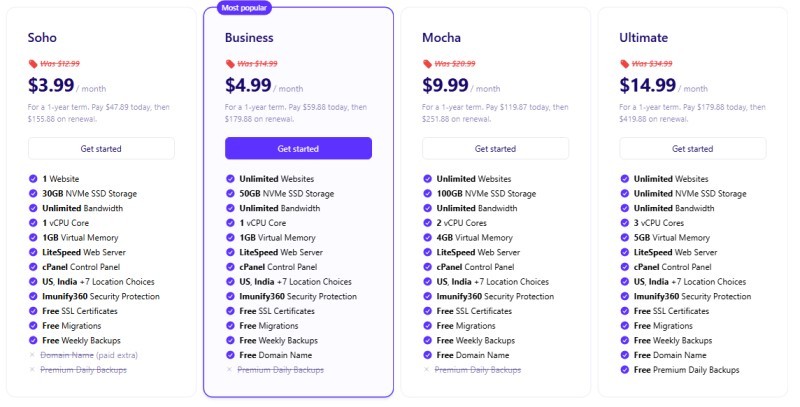
  • You can now see various plans with different prices
How To Order MochaHost Shared Web Hosting?
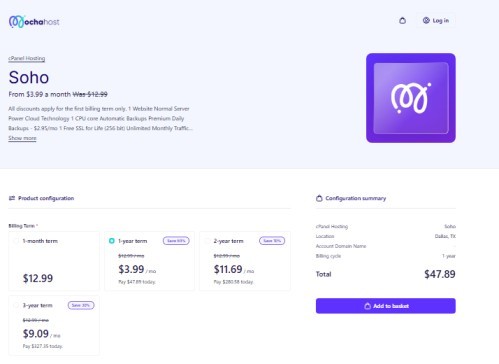
  • Check the features of each package and select a suitable one
  • Then, beneath the package, click the Order Now button.
  • The next step is to select the billing cycle. After selecting the cycle you will see a few options related to the domain
Mochahost
  • You can now register a new Mochahost domain/transfer your domain from another registrar or use your existing domain
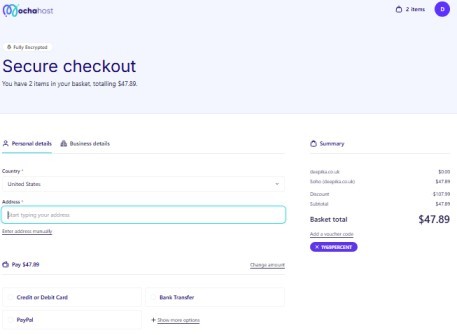
  • Then you need to fill in the required details and click on the continue button
  • You will then have to select the payment method and make the payment to successfully purchase the package.
Mocha Payment

If Also you want to know about the Bacloud Support | Popular Hosting Free Try. Expert Support

How To Order Dedicated/Cloud Servers?

To order dedicated or cloud servers, you need to follow the steps given below to successfully Order Hosting From MochaHost.

To order dedicated or cloud servers, you need to follow the steps given below.
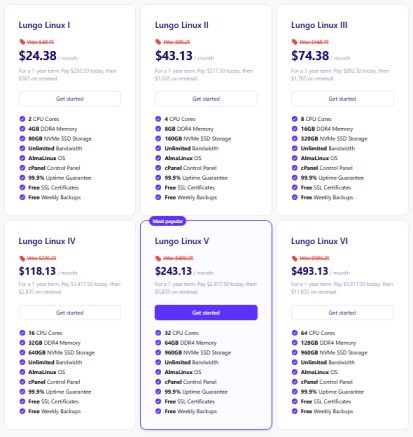
  • Open the website of MochaHost
  • Then look for the dedicated/cloud server option from the hosting section
  • You can now see various plans with different prices
Mochahost Cloud servers
  • Check the features of each package and select a suitable one
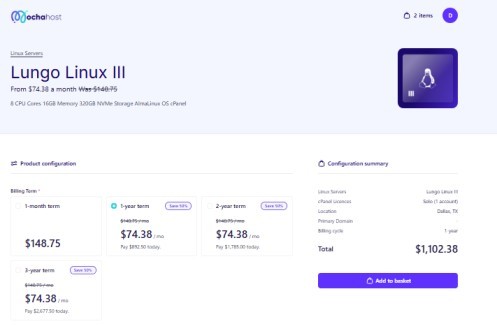
  • Then click on the Order Now button
  • The next step is to select the billing cycle. After selecting the cycle you will see a few options related to the domain
MochaHost Cloud payment
  • You can now register a new domain/transfer your domain from another registrar or use your existing domain
  • Then you need to fill in the required details and click on the continue button
  • You will then have to select the payment method and make the payment to purchase the package successfully.

How To Order Reseller Web Hosting?

Follow the guidelines given in this section to Order Hosting From MochaHost reseller web hosting.
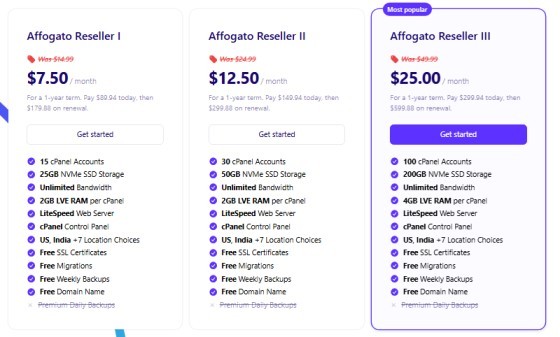
  • Open the website of MochaHost
  • Then look for a reseller web hosting option from the hosting section
  • You can now see various plans with different prices
Mochahost Reseller price
  • Check the features of each package and select a suitable one
  • Then click on the Order Now button
  • The next step is to select the billing cycle. After selecting the cycle you will see a few options related to the domain
  • You can now register a new domain/transfer your domain from another registrar or use your existing domain
  • Then you need to fill in the required details and click on the continue button
  • You will then have to select the payment method and make the payment to successfully purchase the package.

If Also you want to know about the Order Hosting From PiVPS & Best Windows VPS Hosting 2023

How Can I View And Edit an Order in MochaHost?

You can view and edit your order in MochaHost by logging in to your MochaHost client area. After accessing your portal, you can go to the My Orders section to see all the details regarding your purchases.

You can edit the order here as per your requirement. If Also you want to know How To Order Hosting From Abelohost

How To Order WordPress Hosting?

To Order Hosting From MochaHost for WordPress Hosting, you should first visit the official website. Then follow the steps given below.

  • Click on the WordPress tab on the homepage
  • From the sub-menu, you should select WordPress packages
Order WordPress Hosting from MorchaHost
  • You can now see various plans with different prices
  • Check the features of each package and select a suitable one
  • Then click on the Sign-Up button
  • The next step is to select the billing cycle. After selecting the cycle you will see a few options related to the domain
  • You can now register a new domain/transfer your domain from another registrar or use your existing domain
  • Then you need to fill in the required details and click on the continue button
  • Make the payment to finish your request to Order Hosting From MochaHost.

Order Hosting From MochaHost | FAQs

How Do I Get Hosting From MochaHost?

You must visit the website of MochaHost and look for the suitable hosting option they provide. Then you need to purchase the package that meets your requirements.

Is MochaHost Good?

MochaHost is a reliable website hosting service with top-notch customer care. Quick answer and excellent live chat MochaHost support! Excellent customer service and uptime… They offer excellent live chat service and extremely low-cost web hosting with free SSL.

How Do I Add a Domain To MochaHost?

If you have purchased your domain from another registrar, then you need to transfer your domain to MochaHost.

Conclusion

MochaHost’s services, including shared hosting, come with a 100% uptime guarantee. There are also credits available to compensate for any downtime.

Ordering hosting from MochaHost is a quick and seamless process, regardless of the plan you choose. From selecting your billing cycle to configuring your domain, their user-friendly interface is designed for both beginners and pros.

Don’t forget that MochaHost offers a unique lifetime discount and a massive 180-day money-back guarantee, making it one of the safest investments in the hosting market today.

They also offer MochaHost promo codes for clients to avail of discounts.

Leave a Comment

Your email address will not be published. Required fields are marked *

Scroll to Top